PieChart (class)
public PieChart {inherits Chart}
Package: CURL.GUI.CHARTS

A Chart with the appearance of a pie chart.

Description

PieChart is comprised of PieSet objects, in much the same way that LayeredChart is comprised of ChartLayers. However, there is no overlap; each PieSet is a concentric ring in a single pie chart. Most commonly, there will only be a single PieSet, resulting in a traditional pie chart.

The PiePlotArea object, available as PieChart.plot-area, represents the plot area of a PieChart. It can be used to specify a background and to describe the location and dimensions of the plot area. It also serves as the Shape container for all PieSets.

Notes

This object can be styled by writing style rules for "PieChart".

Example

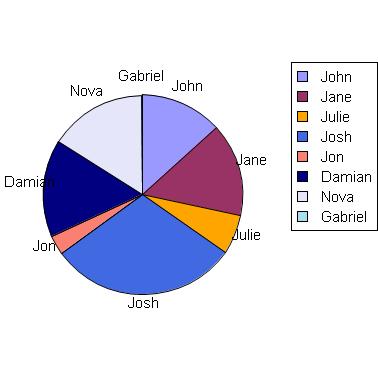
Note the use of PieSet.label-data to provide labels and legend information for each wedge. In the absence of this value, no labels will be shown.


Example: Using PieChart
{import * from CURL.GUI.CHARTS}
{import * from CHARTS-DOC,
    location = "../docstring-support/gui/charts-doc.scurl"
}

{AntialiasedFrame
    {PieChart
        width = 10cm,
        height = 10cm,
        {PieSet
            sample-records,
            "Age",
            label-data = {ChartDataSeries sample-records, "Name"}
        }
    }
}


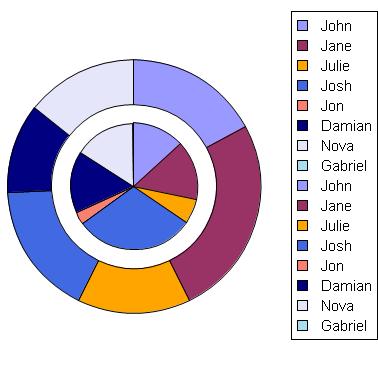
This example demonstrates multiple pie sets. PieSet.wedge-labels? is used to inhibit label generation for a cleaner chart. The inner ring corresponds to the "Age" data series, and the outer ring to "Wins".


Example: Multiple PieSets inside a PieChart
{import * from CURL.GUI.CHARTS}
{import * from CHARTS-DOC,
    location = "../docstring-support/gui/charts-doc.scurl"
}
{PieChart
    width = 10cm,
    height = 10cm,
    pie-set-inner-margin = .5cm,
    {PieSet
        sample-records,
        "Age",
        wedge-labels? = false,
        label-data =
            {ChartDataSeries sample-records, "Name"}
    },
    {PieSet
        sample-records,
        "Wins",
        wedge-labels? = false,
        label-data =
            {ChartDataSeries sample-records, "Name"}
    }
}


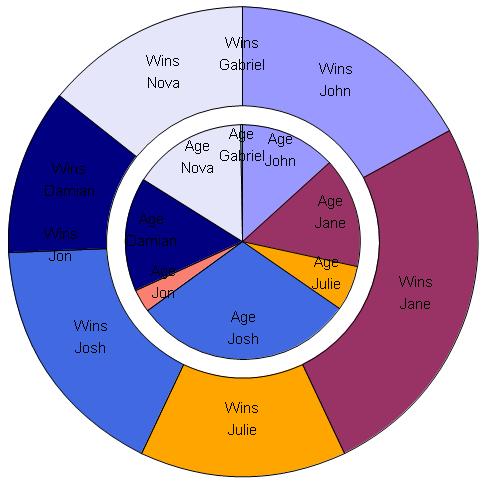
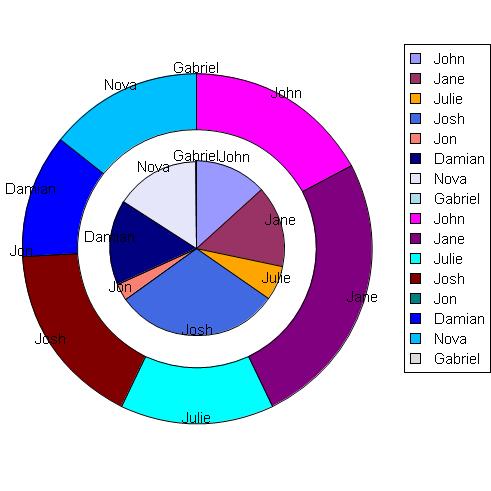
Finally, this example demonstrates using multiple pie sets with the PieSet.label-set? property to display a label explaining what each ring is graphing.


Example: Using PieSet.label-set?
{import * from CURL.GUI.CHARTS}
{import * from CHARTS-DOC,
    location = "../docstring-support/gui/charts-doc.scurl"
}

{PieChart
    width = 13cm,
    height = 13cm,
    pie-set-inner-margin = .5cm,
    pie-label-radius = -7mm,
    legend-enabled? = false,
    {PieSet
        sample-records,
        "Age",
        label-set? = true,
        label-data =
            {ChartDataSeries sample-records, "Name"}
    },
    {PieSet
        sample-records,
        "Wins",
        pie-label-radius = -14mm,
        label-set? = true,
        label-data =
            {ChartDataSeries sample-records, "Name"}
    }
}


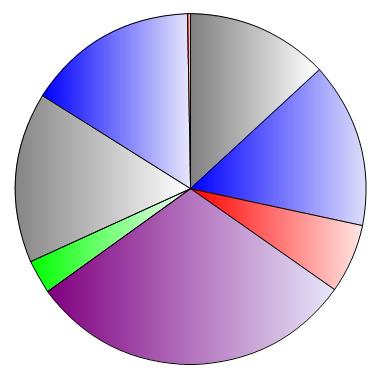
This example demonstrates the use of gradients in a PieChart.


Example: Using gradients in a PieChart
{import * from CURL.GUI.CHARTS}
{import * from CHARTS-DOC,
    location = "../docstring-support/gui/charts-doc.scurl"
}

{define-proc package {h-gradient
                         start-color:FillPattern,
                         end-color:FillPattern
                     }:FillPattern
    {return
        {LinearGradientFillPattern
            {Fraction2d 0, 0},
            {Fraction2d 1, 0},
            {Spectrum.from-envelope
                start-color,
                0.0,
                end-color,
                1.0
            }
        }
    }
}

{PieChart
    width = 10cm,
    height = 10cm,
    color-palette =
        {new {Array-of FillPattern},
            {h-gradient "gray", "white"},
            {h-gradient "blue", "lavender"},
            {h-gradient "red", "mistyrose"},
            {h-gradient "purple", "lavender"},
            {h-gradient "lime", "mintcream"}
        },
    {PieSet
        sample-records,
        "Age"
    }
}

Constructors
default:Construct a new PieChart.
constructor public {PieChart.default
plot-area:PiePlotArea = {PiePlotArea},
width:Distance = -1m,
height:Distance = -1m,
legend-location:LegendLocation = LegendLocation.right,
legend-alignment:double = 0.2,
color-palette:{Array-of FillPattern} = default-chart-color-palette,
match-colors-across-sets?:bool = true,
...
}

Properties
inner-radius:A margin at the center of this chart, inside the first PieSet.
local option public PieChart.inner-radius:any =0m
match-colors-across-sets?:Specifies whether or not this PieChart should try to ensure that the same Record will display with the same color when shown in multiple PieSets.
accessor public final PieChart.match-colors-across-sets?:bool
setter public final PieChart.match-colors-across-sets?:bool
plot-area:The PiePlotArea object associated with the plot area of this PieChart.
field public constant PieChart.plot-area:PiePlotArea
sets:The array of PieSets comprising this PieChart.
field public constant PieChart.sets:{Array-of PieSet} ={new {Array-of PieSet}}
style-element:The "element" or "type" of this Visual, for the purpose of styling.
accessor public PieChart.style-element:String
Properties inherited from Chart: bottom-margin, color-palette, default-height, default-width, display-context, font-family, font-size, font-style, font-weight, height, layout-scheduled?, left-margin, legend-alignment, legend-enabled?, legend-entry-factory, legend-factory, legend-location, legend-shape, plot-area-bounds, right-margin, text-line-through?, text-underline?, top-margin, width
Properties inherited from Shape: as-Shape, border-color, color, draw-operation, graphical-parent, option-parent, possibly-displayed?, selection-context, shape-parent, shape-selectable, stroke-thickness, transformation, visible?
Properties inherited from ShapeContainerBase: as-ShapeRoot, shape-children
Properties inherited from Visual: _style-element, clonable-class?, completely-clonable-children?, cursor, data-source, dragee, has-key-focus?, input-method-enabled?, input-method-keyboard-mode, name, options, style-class, style-manager, style-options, test-child?, test-description, test-name, test-parent?, test-type-name, test-visible?, tooltip, user-data, visual-parent
Properties inherited from DataBindingTarget: data-binding-context, data-bindings
Properties inherited from EventTarget: event-handlers
Properties inherited from OptionListInterface: option-register-proc, options-present-here, registered-option-keys

Methods
append-pie-set:Add a PieSet to this PieChart.
public {PieChart.append-pie-set pie-set:PieSet}:void
estimate-margins:Approximate the margin requirements of this Chart.
protected {PieChart.estimate-margins
need-left?:bool,
need-right?:bool,
need-top?:bool,
need-bottom?:bool,
left:Distance,
right:Distance,
top:Distance,
bottom:Distance
}:(left:Distance, right:Distance, top:Distance, bottom:Distance)
get-legend-entries:Create all entries required for this Chart's legend.
public {PieChart.get-legend-entries}:{Array-of Graphic}
get-pie-set-at-point:Find the PieSet, if any, at a specific point in this PieChart.
public {PieChart.get-pie-set-at-point x:Distance, y:Distance}:#PieSet
invalidate-layout:Request that the Chart perform layout soon.
public {PieChart.invalidate-layout}:void
non-keyword-init-arg:Invoked when InitRestArgParser.process-rest-args encounters a non-keyword argument.
public {PieChart.non-keyword-init-arg arg:any}:void
note-sets-order-changed:Notify this PieChart that the order of PieChart.sets has changed.
public {PieChart.note-sets-order-changed}:void
remove-pie-set:Remove a PieSet from this PieChart.
public {PieChart.remove-pie-set pie-set:PieSet}:void
update-layout:Perform layout based on Chart.plot-area-bounds.
public {PieChart.update-layout}:void
Methods inherited from Chart: constrain-own-layout-bounds, create-legend, draw, ensure-layout-valid, get-actual-bottom-margin, get-actual-left-margin, get-actual-right-margin, get-actual-top-margin, get-own-bounds, get-shape-layout-bounds, layout-chart, note-color-palette-changed, position-legend, request-draw, self-contains-point?, self-intersects-polygon?, set-chart-size, to-Graphic, transformation-changed
Methods inherited from Shape: apply-rotation, apply-scale, apply-transformation, apply-translation, apply-translation-in-parent, constrain-shape-layout-bounds, contains-point?, detach, find-graphical-ancestor, fire-crossing-event, fire-in-child, get-display-context, get-down-orientation-in-shape-parent, get-graphical-root, get-gui-path, get-gui-path-to-child, get-local-device-pixel-size, get-origin-in-graphical-ancestor, get-origin-in-root, get-origin-in-shape-parent, get-origin-in-shape-root, get-own-bounds-in-shape-root, get-own-layout-bounds, get-right-orientation-in-shape-parent, get-shape-bounds, get-shape-bounds-in-shape-root, get-top-left-in-ancestor, get-transformation-to-shape-root, keyword-init-arg, option-change-notify, overdraw-for-selection, quantize-line-thickness, request-draw-self, reset-transformation, set-rotation, set-scale, set-transformation, set-translation-in-parent, transform-from-display-coordinates, transform-from-graphical-root-coordinates, transform-point-from-shape-root, transform-point-to-shape-root, transform-to-display-coordinates, transform-to-graphical-root-coordinates, transform-vector-from-shape-root, transform-vector-to-shape-root, transformation-changing
Methods inherited from ShapeContainerBase: add, clear, clone-children, draw-shape-child, draw-shape-children, get-all-children-at-point, get-child-at-point, get-leaf-at-point, get-shape-root, note-attached, note-detaching, notify-option-children, on-drag-enter, on-pointer-enter, on-pointer-envelope-event, register-options, remove, set-shape-index, set-shape-index-after, set-shape-index-before, shape-container-fire-inferior-crossing-event, shape-container-handle-crossing, shape-container-pick-child, shape-container-pointer-enter-occurred, shape-container-pointer-leave-occurred
Methods inherited from Visual: add-from-init-args, animate, change-cursor, clonable-appearance?, clone-appearance, clone-appearance-helper, find-test-children, get-focus-manager, get-layout-context, get-test-parent, get-test-property, get-text, get-view, maybe-fire-attach-event, maybe-fire-detach-event, note-caret-position, on-drag-leave, on-pointer-leave, pop-cursor, prepare-test-object, prepare-test-parent, push-cursor, quantize-width, refresh-style-options, release-key-focus, request-key-focus, scroll-to-include, test-record, test-run, xy-offset-to
Methods inherited from GraphicOptions: any-to-Distance
Methods inherited from GuiEventTarget: handle-delegate-event, handle-event, on-action, on-cancel-mode, on-command-changed, on-commit, on-composition-change-event, on-composition-result-event, on-context-menu-event, on-current-record-change-request, on-current-record-changed, on-destroy-notify, on-destroy-requested, on-drag-over, on-drag-pointer, on-drag-started, on-drop, on-end-composition-event, on-focus-event, on-focus-in, on-focus-out, on-gesture, on-gesture-begin, on-gesture-end, on-gesture-magnify, on-gesture-pan, on-gesture-rotate, on-gesture-swipe, on-gesture-tap, on-gesture-touch, on-grab-release, on-gui-event, on-input-method-event, on-inspection, on-key-event, on-key-press, on-pointer-button, on-pointer-crossing, on-pointer-event, on-pointer-motion, on-pointer-press, on-pointer-release, on-pointer-scroll, on-raw-key-event, on-raw-key-press, on-raw-key-release, on-reset, on-selectable-added, on-selectable-removed, on-selection-changed, on-selection-context-activated, on-selection-context-deactivated, on-selection-event, on-start-composition-event, on-start-event, on-stop-event, on-view-activate, on-view-deactivate, on-window-close, remove-event-handlers-for-event-class
Methods inherited from DataBindingTarget: add-data-binding, get-data-binding, refresh-data-binding, remove-data-binding, unset-property, update-data-binding, validate-data-binding
Methods inherited from EventTarget: accepts-event-class?, add-event-handler, event-handler-present?, remove-event-handler, verify-event
Methods inherited from OptionListInterface: add-option, add-style-option, change-option-parent-notify, clone-options, get-option, get-option-by-name, local-add-notify, local-remove-notify, name-to-option-key, new-option-item, option-changed, option-lookup, option-lookup-here, option-propagate-notify, option-set?, propagate-option-change, remove-option, remove-style-option, remove-styles, set-option-by-name, set-style-option-by-name, unset-option-by-name, unset-style-option-by-name
Methods inherited from BasicEventTarget: enqueue-event
Methods inherited from InitRestArgParser: process-rest-args
Methods inherited from Object: object-describe, object-describe-for-debugging, object-serialize


Constructor Details
default (constructor)
public {PieChart.default
plot-area:PiePlotArea = {PiePlotArea},
width:Distance = -1m,
height:Distance = -1m,
legend-location:LegendLocation = LegendLocation.right,
legend-alignment:double = 0.2,
color-palette:{Array-of FillPattern} = default-chart-color-palette,
match-colors-across-sets?:bool = true,
...
}

Construct a new PieChart.

plot-area: A PiePlotArea object to represent the plot area of this chart. See PieChart.plot-area.
width: Initial width of the chart; see Chart.width.
height: Initial width of the chart; see Chart.height.
legend-location: Initial location of the legend; see Chart.legend-location.
legend-alignment: Initial alignment of the legend; see Chart.legend-alignment.
color-palette: An array of FillPatterns to be used when plotting data series. See Chart.color-palette for more information.
match-colors-across-sets?: If true, then the chart will attempt to ensure that a single Record, when displayed in multiple PieSets, will use the same color.
...: The rest arguments may be:

Notes

If the width or height value is not provided, the PieChart will adapt to the size of a containing ChartBox or a LayeredChart along that dimension. See Chart.set-chart-size and CURL.GUI.CHARTS for an example.

Example

See PieChart.


Property Details
inner-radius (local option)
public PieChart.inner-radius:any =0m

A margin at the center of this chart, inside the first PieSet.

Description

This option is similar to pie-set-inner-margin, but it only applies to the first PieSet. In contrast, pie-set-inner-margin applies to every pie set except the first one.

Example

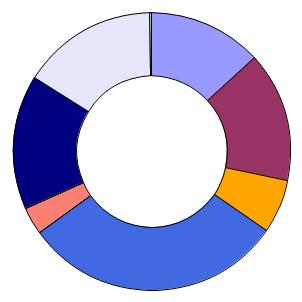
This example uses inner-radius to turn what would otherwise have been an ordinary pie chart into a ring. See also pie-set-inner-margin for an interactive demonstration.


Example: Changing the PieSet.inner-radius option
{import * from CURL.GUI.CHARTS}
{import * from CHARTS-DOC,
    location = "../docstring-support/gui/charts-doc.scurl"
}

{PieChart
    width = 8cm,
    height = 8cm,
    inner-radius = 2cm,
    {PieSet
        sample-records,
        "Age"
    }
}


match-colors-across-sets? (accessor)
accessor public final PieChart.match-colors-across-sets?:bool
setter public final PieChart.match-colors-across-sets?:bool

Specifies whether or not this PieChart should try to ensure that the same Record will display with the same color when shown in multiple PieSets.

Example


Example: Using PieChart.match-colors-across-sets?
{import * from CURL.GUI.CHARTS}
{import * from CHARTS-DOC,
    location = "../docstring-support/gui/charts-doc.scurl"
}

{PieChart
    width = 13cm,
    height = 13cm,
    pie-set-inner-margin = 24pt,
    pie-label-radius = 0m,
    match-colors-across-sets? = false,
    {PieSet
        sample-records,
        "Age",
        label-data =
            {ChartDataSeries sample-records, "Name"}
    },
    {PieSet
        sample-records,
        "Wins",
        label-data =
            {ChartDataSeries sample-records, "Name"}
    }
}


plot-area (field)
public constant PieChart.plot-area:PiePlotArea

The PiePlotArea object associated with the plot area of this PieChart.

Description

This object is set via the constructor PieChart.default. See PiePlotArea for more information.


sets (field)
public constant PieChart.sets:{Array-of PieSet} ={new {Array-of PieSet}}

The array of PieSets comprising this PieChart.

Notes

Do not modify the contents of this array. It is permissible to modify the order of the objects in this array, but you must call PieChart.note-sets-order-changed whenever you do so.


style-element (accessor)
accessor public PieChart.style-element:String

The "element" or "type" of this Visual, for the purpose of styling.

Description

This implementation returns the value of Visual._style-element but is normally overridden to return a constant value.

Overriding

If a subclass of Visual should be stylable separately from other types of objects, this getter should be overridden to return an appropriate string. By convention, this string is the name of the class or the name of the markup that produces the object.

An override must return self._style-element if it is not the empty string.
Introduced in: version 6.0


Method Details
append-pie-set (method)
public {PieChart.append-pie-set pie-set:PieSet}:void

Add a PieSet to this PieChart.

pie-set: The PieSet to add.

Description

The added set will appear at the end of PieChart.sets. This means that it will appear outside of existing sets. If you wish to change the order of the sets, you may directly manipulate the array. You must always call PieChart.note-sets-order-changed after doing so.


estimate-margins (method)
protected {PieChart.estimate-margins
need-left?:bool,
need-right?:bool,
need-top?:bool,
need-bottom?:bool,
left:Distance,
right:Distance,
top:Distance,
bottom:Distance
}:(left:Distance, right:Distance, top:Distance, bottom:Distance)

Approximate the margin requirements of this Chart.

need-left?: Indicates whether an estimation is requried for the left margin. Otherwise, left should be returned for the left margin.
need-right?: Indicates whether an estimation is requried for the right margin. Otherwise, right should be returned for the right margin.
need-top?: Indicates whether an estimation is requried for the top margin. Otherwise, top should be returned for the top margin.
need-bottom?: Indicates whether an estimation is requried for the bottom margin. Otherwise, bottom should be returned for the bottom margin.
left: Indicates the default value of the left margin. If need-left? is true, then this value will be returned verbatim. Otherwise, it is ignored.
right: Indicates the default value of the right margin. If need-right? is true, then this value will be returned verbatim. Otherwise, it is ignored.
top: Indicates the default value of the top margin. If need-top? is true, then this value will be returned verbatim. Otherwise, it is ignored.
bottom: Indicates the default value of the bottom margin. If need-bottom? is true, then this value will be returned verbatim. Otherwise, it is ignored.

Description

This method is used internally during the layout process. It is not expected that you will ever need to directly call this method; instead, use Chart.get-actual-left-margin, Chart.get-actual-right-margin, Chart.get-actual-top-margin, or Chart.get-actual-bottom-margin. If necessary, these calls will result in calls to this method.

Notes

Before it calls estimate-margins, the Chart layout system will set the chart's plot-area-bounds to the entire chart area as a first-order approximation. Implementations of estimate-margins are free to overwrite these during the estimation process as necessary.


get-legend-entries (method)
public {PieChart.get-legend-entries}:{Array-of Graphic}

Create all entries required for this Chart's legend.

Description

Generally speaking, this method iterates through the plot components of the chart (for instance, the ChartLayers of a LayeredChart) and creates all entries required for each of them.

This method is usually called by the Chart.legend-factory, itself called by Chart.create-legend. See Chart.default-legend-factory for an explanation of how the legend entries are handled by default.


get-pie-set-at-point (method)
public {PieChart.get-pie-set-at-point x:Distance, y:Distance}:#PieSet

Find the PieSet, if any, at a specific point in this PieChart.

x: The x coordinate.
y: The y coordinate.

Returns

The PieSet at the point, or null if no set covers the point.

Description

This method uses Shape.get-child-at-point. Some Shape object belonging to a PieSet must be at the point provided; otherwise, no PieSet will be found, and this method will return null.

Note that the coordinate is interpreted relative to the PieChart's origin. (That is, relative to the top-left corner of the chart.)

Notes

For other techniques related to this one, see:


invalidate-layout (method)
public {PieChart.invalidate-layout}:void

Request that the Chart perform layout soon.

Description

Chart layout does not usually occur immediately upon invalidation. This is because invalidating changes usually occur in batches. For instance, if the data referred to by a ChartDataSeries changes, it is likely to trigger invalidations through multiple paths; if the data is used by both a ChartAxis and a ChartLayer, for example, both objects will notify the Chart to invalidate its layout via this method.

To prevent such scenarios from causing repeated, unnecessary layout operations, a delay system is used. The first call to this method schedules a layout using an Alarm. Subsequent calls do nothing, until layout actually occurs.

This means that when you make changes to a Chart or its associated data, you will need to call Chart.ensure-layout-valid if you want layout-dependent values to be updated immediately. (This should only be necessary if you intend to programmatically interact with elements of the Chart that are subject to change upon layout, such as ChartAxis objects, or the contents of ChartLayers.) Alternatively, you may also use the ChartLayoutChanged event to receive notification whenever Chart layout finishes, and perform whatever operations depend on layout in an event handler.

Note that layout invalidation can occur for many reasons, so you should handle ChartLayoutChanged events if you need to know when layout-dependent values have changed.

Notes

Most applications should not need to cause layout invalidation directly. You might need to do so if you write your own charting classes that have their own layout-invalidating scenarios. (For instance, if you write a ChartAxis subclass that depends on external data, when that data changes, you might need call Chart.invalidate-layout.)

You might also need to call this method if you supplied a factory procedure, such as BarLayer.shape-factory, which depended on external data to calculate its shape. If that external data changes, it would be necessary to trigger layout to ensure that the shapes were regenerated.


non-keyword-init-arg (method)
public {PieChart.non-keyword-init-arg arg:any}:void

Invoked when InitRestArgParser.process-rest-args encounters a non-keyword argument.

Description

Visual's implementation of this method will first attempt to interpret the input to this method as meta-data to be associated with the object. For example, EventHandlers and DataBindings to be associated with the object are recognized and the appropriate steps are taken to attach them to the object.

Any input that cannot be understood as meta-data is assumed to be contents to be added to the Visual and passed to Visual.add-from-init-args.

Overriding

Override this method to accept additional meta-data associated with the object. Implementations should typically invoke the super implementation on inputs that they fail to interpret.


note-sets-order-changed (method)
public {PieChart.note-sets-order-changed}:void

Notify this PieChart that the order of PieChart.sets has changed.

Description

You must call this method whenever you rearrange PieChart.sets. It will ensure that the appropriate components of the chart are regenerated. (Note that you may only reorder PieChart.sets; you may not add or remove elements. To do that, use PieChart.append-pie-set or PieChart.remove-pie-set.)


remove-pie-set (method)
public {PieChart.remove-pie-set pie-set:PieSet}:void

Remove a PieSet from this PieChart.

pie-set: The PieSet to remove.

Description

pie-set must be a member of PieChart.sets. An error will occur if it is not.


update-layout (method)
public {PieChart.update-layout}:void

Perform layout based on Chart.plot-area-bounds.

Description

This method is only called from within Chart.ensure-layout-valid. Chart implementations perform their actual layout, such as positioning and sizing axes, in this method. Also, implementations are expected to fire ChartLayoutChanged events at themselves and any relevant chart objects within this method.