| Summary: | - Operator expressions perform an operation and return
a result.
- They consist of an operator and one or two operands.
- They use the infix syntax so that the operator will
appear between the operand(s).
|
An operator expression performs an operation, such as
addition or comparison, and returns the result. The
Curl® language provides operators for common
operations. In particular, it supports the following operators:
- Arithmetic Operators:
+,
-,
*,
/,
div,
mod,
rem
- Relational Operators:
==,
!=,
<,
>,
<=,
>=,
isa
- Logical Operators:
and,
or,
not
- String Operator:
&
- Coercion Operator:
asa
- Maybe-null Operator:
#
An operator expression consists of an operator and one or
two operands. Operands are the values with
which the operation is performed. For example, if you add
3 to 4, the operator is addition (+)
and the operands are 3 and 4.
Operator expressions use the infix syntax with
which you are familiar. Infix syntax means that the
operator appears between the operands. There are no
curly braces ({}) surrounding operator expressions.
For example, to add 3 to 4, the necessary
operator expression is as follows:
3 + 4
Most operators are binary operators. A binary
operator takes two operands. However, there are three
unary operators. A unary operator takes only
one operand. The unary operators are: the maybe-null operator
(#), unary negation (-), and logical NOT (not). (Unary negation is the operator that negates a number.)
In most operator expressions, spaces around the operator
are optional. This means that all of the following
expressions are valid:
- 4 + 5
- 4+5
- 3 * (4 + 5)
- 3*(4+5)
However, in the following cases spaces around the operator are
required:
- For subtraction, you must include a space between
the operator and the operands. For example x - y
is valid, while x-y is not. If you do not
include the spaces, the Curl® runtime interprets
x-y as an identifier.
- For unary negation, you must include a space to the
left of the operator and no space between the operator
and the operand. For example 4 - -5 is valid,
while 4 - - 5 is not.
The Curl language provides a library of math functions for less
common operations. The math library includes functions for
comparison, bitwise, trigonometric, scientific, manipulation, and
coercion operations. See
Math Library for more information
on this topic.
| Summary: | - Operators with a higher precedence are
evaluated before operators with a lower
precedence.
- If operators have the same precedence,
the operators are evaluated from left to
right.
- Use parentheses to override the operator
precedence rules.
|
Operator expressions are not surrounded by curly braces. If an
operator expression is an operand to another operator expression,
the runtime uses the precedence of each operator to
determine how it evaluates the expression. For example, in the
following expression, it first evaluates the multiplication
operation and then evaluates the addition operation (producing 23,
not 35):
3 + 4 * 5
The runtime evaluates each operator in turn, from highest
precedence to lowest precedence. In other words, operators with a
higher precedence are evaluated before operators with a lower
precedence. Operators having the same precedence are evaluated
from left to right.
The following table indicates the precedence of each Curl language
operator. The operator with 0th precedence is considered to have
the highest precedence, while the operator with 9th precedence has
the lowest.
| Precedence | Operator | Description |
|---|
| 0th | # | Maybe-null |
|
|
|
| 1st | - | Unary negation |
|
|
|
| 2nd | asa | Coercion |
|
|
|
| 3rd | * | Multiplication |
| 3rd | / | Floating-point division |
| 3rd | div | Truncating division |
| 3rd | mod | Modulo |
| 3rd | rem | Remainder |
|
|
|
| 4th | + | Addition |
| 4th | - | Subtraction |
|
|
|
| 5th | & | String concatenation |
|
|
|
| 6th | == | Equality |
| 6th | != | Inequality |
| 6th | < | Less than |
| 6th | > | Greater than |
| 6th | <= | Less than or equal to |
| 6th | >= | Greater than or equal to |
| 6th | isa | Type verification |
|
|
|
| 7th | not | Logical NOT |
|
|
|
| 8th | and | Logical AND |
|
|
|
| 9th | or | Logical OR |
You can use parentheses to override the operator precedence rules.
If an expression includes a number of operators, and the operator
precedence is such that the runtime will not evaluate the
operators in the order that you intend, use parentheses to group
the operators. When it encounters a parenthesized expression, it
evaluates the parenthesized expression and returns the result to
the surrounding expression. For example, if you want to multiply
5 by the sum of 3 + 4, you might attempt to write
the following code:
3 + 4 * 5
However, because of the operator precedence rules, the runtime
performs the multiplication before the addition. This
results in it adding the product of 4 * 5 to 3,
which is not what you want. To ensure that it adds 3 to
4, use parentheses to surround the addition operation:
(3 + 4) * 5
Now, the runtime first evaluates 3 + 4 and returns the
result to the surrounding expression. The following
example shows this in practice:
| Example:
Operator Precedence |
 |
{text
    3 + 4 * 5 = {value 3 + 4 * 5}

    (3 + 4) * 5 = {value (3 + 4) * 5}
}
| |
Note: In the example above, the operator expressions, such as 3 +
4 * 5, are enclosed within value expressions. Within a
text format, you must use the value expression to tell the
runtime to treat the enclosed code as an expression instead of
text.
| Summary: | - In operations involving a float but no
doubles, the result is a float.
- Otherwise, if the operation involves a double,
the result is a double.
- Otherwise, if the operation involves an int64,
the result is an int64.
- Otherwise, the result is an int.
- 32-bit quantity values, such as 1.5f(m), are
treated analogously to float, and 64-bit quantity
values, such as 1m, are treated analogously
to double.
|
The following table describes the arithmetic operators in
the Curl language:
| Operator | Description | Operands | Returns |
|---|
| - | Unary negation | One numeric
expression | A numeric value |
| * | Multiplication | Two numeric
expressions | A numeric value |
| / | Floating-point division | Two numeric
expressions | A floating-point numeric value |
| div | Division | Two numeric
expressions | An integral numeric value |
| mod | Modulo | Two numeric
expressions | A numeric value |
| rem | Remainder | Two numeric
expressions | A numeric value |
| + | Addition | Two numeric
expressions | A numeric value |
| - | Subtraction | Two numeric
expressions | A numeric value |
The unary negation operator is the only arithmetic operator
that has one operand. It has the following syntax:
-expression
where expression is a numeric expression.
Note: There is no space between the unary operator and
expression. Unary negation is not allowed
on operands of type uint or uint64.
The data type of the return value of an arithmetic expression
depends on the data type of the operands. The runtime
applies the following contagion rules to determine the data type
of the result of an arithmetic operation:
- In operations involving a float but no
doubles, the result is a float.
- Otherwise, if the operation involves a double,
the result is a double.
- Otherwise, if the operation involves a uint64
or uint and a smaller unsigned integer type,
the result is a uint64 or uint respectively.
Operations involving uint or uint64
and a signed type are not allowed and will result in
an error.
- Otherwise, if the operation involves an int64,
the result is an int64.
- Otherwise, the result is an int.
- 32-bit quantity values, such as 1.5f(m), are
treated analogously to float, and 64-bit quantity
values, such as 1m, are treated analogously
to double.
| Example:
Contagion in the Curl Language |
 |
{value
    || Declare an integer "x" and initialize it to 28
    let x:int = 28
    || Declare a double "y" and initialize it to 3.0
    let y:double = 3.0
    || Declare an int "z" and initialize it to 3
    let z:int = 3

    {text
        || Output the value of "x / y" and then output the
        || data type of the result.
        || According to the rules, the result should be a
        || double (or a quantity)
        x / y is ... {value x / y}, which is a {type-of x / y}
        || Output the value of "x / z" and then output the
        || data type of the result.
        x div z is ... {value x div z}, which is a {type-of x div z}
    }
}
| |
Note: When you divide an int by an int using the div operator, the result is an int. Because an int
does not have a decimal part, such operations might lead to loss
of information.
In the example above, the result of
x / y should be a
double, while the result of
x div y should be an
int. Observe that the operator expression (
x / y)
is enclosed within a
value expression. Within a text
format, you must use the
value expression to tell the runtime
to treat the enclosed code as an expression instead of
text.
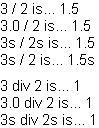
You can use the
/ and
div operators to divide
numeric operands. Numeric operands can be integers,
floating-point numbers, quantities, or vectors. The
/
operator takes two numeric operands and returns a
double or
a quantity. The
div operator takes two numeric operands
and returns an
int.
| Example:
Using the / and div Operators |
 |
{text 3 / 2 is...}     {value 3 / 2}
{br}{text 3.0 / 2 is...}   {value 3.0 / 2}
{br}{text 3s / 2s is...}    {value 3s / 2s}
{br}{text 3s / 2 is...}    {value 3s / 2}

{text 3 div 2 is...}   {value 3 div 2}
{br}{text 3.0 div 2 is...} {value 3.0 div 2}
{br}{text 3s div 2s is...}  {value 3s div 2s}
|| Note that you cannot use div to divide
|| 3 seconds by 2.  You can use only the /
|| operator in this case.
| |
Note: In the example above, {br} introduces a line break in the
output.
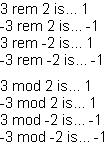
The mod operator returns the modulo of the operands. The
rem operator returns the remainder after dividing the
operands.
| Example:
The rem and mod Operators |
 |
{text 3 rem 2 is...}   {value 3 rem 2}
{br}{text -3 rem 2 is...}  {value -3 rem 2}
{br}{text 3 rem -2 is...}  {value 3 rem -2}
{br}{text -3 rem -2 is...} {value -3 rem -2}

{text 3 mod 2 is...}   {value 3 mod 2}
{br}{text -3 mod 2 is...}  {value -3 mod 2}
{br}{text 3 mod -2 is...}  {value 3 mod -2}
{br}{text -3 mod -2 is...} {value -3 mod -2}
| |
| Summary: | - Relational operators compare the
operands and return a Boolean value.
- There are relational operators for
comparing numeric values.
- There is a relational operator for
comparing a value and a data type.
|
The following table describes the relational operators in
the Curl language:
| Operator | Description | Operands | Returns |
|---|
| == | Equality | Two any
expressions | Boolean |
| != | Inequality | Two any
expressions | Boolean |
| < | Less than | Two
numeric expressions | Boolean |
| > | Greater than | Two
numeric expressions | Boolean |
| <= | Less than or equal to | Two
numeric expressions | Boolean |
| >= | Greater than or equal to | Two
numeric expressions | Boolean |
| isa | Type verification | An
expression and a type | Boolean |
When evaluating a relational expression, the runtime
compares the operands and returns a Boolean value. That is, it
returns either
true or
false.
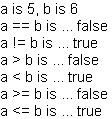
Like many object-oriented languages, the Curl language performs
value comparisons for primitive values and pointer comparisons for
objects. (There are a few exceptions to this rule, for example,
String and
DateTime objects are compared by
value.) If you use a relational operator to compare two primitive
values, the runtime compares the values and returns the
result. This kind of comparison is called value comparison or
structural comparison.
| Example:
Value Comparison |
 |
{value
    || Declare and initialize two variables "a"
    || and "b"
    let a:int = 5
    let b:int = 6

    || Use each relational operator, in turn to
    || compare "a" and "b"
    {text a is {value a}, b is {value b}
        {br}a == b is ... {value a == b}
        {br}a != b is ... {value a != b}
        {br}a > b is ... {value a > b}
        {br}a < b is ... {value a < b}
        {br}a >= b is ... {value a >= b}
        {br}a <= b is ... {value a <= b}
    }
}
| |
If the operands in a relational operator expression do not
evaluate to the same data type, the runtime attempts to
coerce the values to compatible types. To coerce the values, it
applies the contagion rules outlined in
Arithmetic Expressions. One exception is
when comparing a
uint or
uint64 with a signed
integer type, in which case the comparison is allowed and is
performed using the values without coercion.
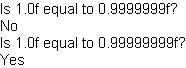
If you compare two floating-point numbers, be aware that the
precision of floating-point numbers can affect the result.
| Example:
Comparing Single-Precision Floating-point Numbers |
 |
{value
    || Declare three floats "a", "b", and "c".
    || Initialize "a" to 1.0f.
    || Initialize "b" to .9999999f, which is within
    || the limit of the number of significant digits
    || for a float.
    || Initialize "c" to .99999999f, which is not
    || within the limit.
    || Declare and initialize a VBox called "message"
    || which will contain the output of this example.
    let a:float = 1.0f
    let b:float = 0.9999999f
    let c:float = 0.99999999f
    let message:VBox = {VBox}

    || Test whether "a" is equal to "b" and add the
    || appropriate text to "message"
    {message.add {paragraph Is 1.0f equal to 0.9999999f?}}
    {if a == b then
        {message.add {text Yes}}
     else
        {message.add {text No}}
    }

    || Test whether "a" is equal to "c" and add the
    || appropriate text to "message"
    {message.add {paragraph Is 1.0f equal to 0.99999999f?}}
    {if a == c then
        {message.add {text Yes}}
     else
        {message.add {text No}}
    }

    || Return the value of "message"
    message
}
| |
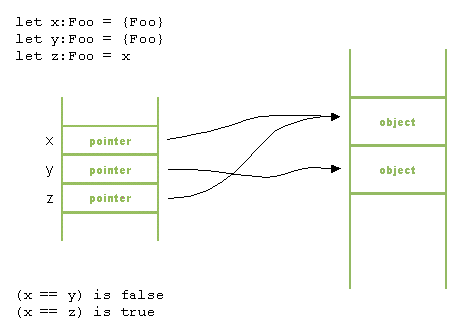
If you use the equality operator to compare two objects, the runtime
compares the values of the pointers to the objects. This
kind of comparison is called pointer comparison or identity
comparison. The following figure illustrates why, even though
x and y have the same value, they are not equal,
since they do not point to the same object:
In the following example, as well, even though x and y have been assigned the same value, they are not equal.
| Example:
Pointer Comparison |
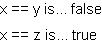 |
{let x:{Array-of int} = {new {Array-of int}, 1, 2, 3}}
{let y:{Array-of int} = {new {Array-of int}, 1, 2, 3}}
{let z:{Array-of int} = x}

x == y is... {value x == y}

x == z is... {value x == z}
| |
However, for certain objects, the runtime overrides the
default pointer comparison. For example, it overrides the default
comparison for objects that inherit from
StringInterface
and
DateTime. For these objects, the runtime
performs value comparison.
| Example:
String Comparison |
 |
{let x:String = {String "Hello"}}
{let y:String = {String "Hello"}}
{let z:String = x}

x == y is... {value x == y}

x == z is... {value x == z}
| |
There is a special relational operator that works with data types.
The
isa operator returns
true if the data type of
the first operand matches the second operand. Otherwise, it
returns
false. It has the following syntax:
expression isa type
where expression evaluates to an object or value and
type evaluates to a class name or a primitive data type.
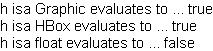
If expression evaluates to an object, isa returns
true if expression is an instance of type or an instance of a subclass of type.
| Example:
Using isa with an Object |
 |
{value
    || Declare a variable to be an instance of
    || the HBox class, which inherits from Graphic
    let h:HBox = {HBox}

    {text h isa Graphic evaluates to ... {value h isa Graphic}{br}
          h isa HBox evaluates to ... {value h isa HBox}{br}
          h isa float evaluates to ... {value h isa float}
    }
}
| |
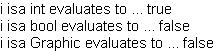
If expression evaluates to a primitive value, isa
returns true if the primitive data type of expression is type. isa returns true
only if the primitive value has the exact data type that you
specify. For example, if you use isa to check if an int8 value is an int, isa will return false.
The following example shows the use of isa with a value.
| Example:
Using isa with a Primitive |
 |
{value
    || Declare an int
    let i:int

    {text i isa int evaluates to ... {value i isa int}
        {br}i isa bool evaluates to ... {value i isa bool}
        {br}i isa Graphic evaluates to ... {value i isa Graphic}
    }
}
| |
See the
Data Types chapter
for more information about data types.
| Summary: | - The logical operators work with Boolean values.
|
The following table describes the logical operators in the Curl
language:
| Operator | Description | Operands | Returns |
|---|
| not | Logical NOT | One Boolean
expression | Boolean |
| and | Logical AND | Two Boolean
expressions | Boolean |
| or | Logical OR | Two Boolean
expressions | Boolean |
Each operand of a logical expression must evaluate to a Boolean
value (true or false). The return value is also a
Boolean value.
The logical AND operator requires two operands. In a logical AND
expression, if both operands evaluate to true, the
expression returns true. Otherwise, the expression returns
false. In particular, if the first operand evaluates to
false, the expression returns false without
evaluating the second expression. If the first operand evaluates
to true, the Curl language evaluates the second operand.
If the second operand then evaluates to true, the
expression returns true; otherwise it returns false.
The logical OR operator requires two operands. In a logical OR
expression, if either or both of the operands evaluate to true, the expression returns true. Otherwise, the
expression returns false. In particular, if the first
operand evaluates to true, the expression returns true without evaluating the second expression. If the first
operand evaluates to false, the runtime evaluates the
second operand. If the second operand then evaluates to true, the expression returns true; otherwise it returns
false.
The logical NOT operator requires one operand. It has the
following syntax:
not expression
where expression is a boolean expression. Note that
there is a space between the not operator and expression. In a logical NOT expression, if the operand
evaluates to true, the expression returns false; if
the operand evaluates to false, the expression returns
true.
| Example:
Using Logical Operators |
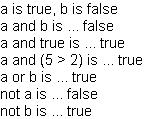 |
{value
    || Declare and initialize two variables "a"
    || and "b"
    let a:bool=true
    let b:bool=false

    || Use the logical operators with "a" and "b"
    {text a is {value a}, b is {value b}
        {br}a and b is ... {value a and b}
        {br}a and true is ... {value a and true}
        {br}a and (5 > 2) is ... {value a and (5 > 2)}
        {br}a or b is ... {value a or b}
        {br}not a is ... {value not a}
        {br}not b is ... {value not b}
    }
}
| |
| Summary: | - The string concatenation operator returns a string that
is formed by concatenating the printed representations of
the operands.
|
The string concatenation operator returns a string that
is formed by concatenating the printed representations of
the operands. See the
Strings chapter for detailed information about strings. The
following table describes the string concatenation operator:
| Operator | Description | Operands | Returns |
|---|
| & | String concatenation | Any expression | String |
The string concatenation operator returns a string that is formed
by concatenating the second operand to the end of the first
operand. If any of the operands do not evaluate to strings, the
runtime attempts to convert them to strings before
concatenation. (The runtime actually calls the
format macro with the
%s key for the operand.)
| Example:
Using the String Concatenation Operator |
 |
{value
    || Declare and initialize an int, char, double,
    || bool, and String variable
    let i:int = 3
    let c:char = '='
    let d:double = 3.7
    let b:bool = false
    let s:String = "a horse"

    || Concatenate some strings
    let temp1:String = s & " is " & s & " ... "
    let temp2:String = i & c & d & " is " & b
    let result:String = temp1 & temp2

    || Return the "result" string
    result
}
| |
| Summary: | - The coercion operator returns a value using the
specified data type.
|
The coercion operator returns a value using the specified data
type. In other words, the coercion operator converts a value to a
specified data type. The following table provides a summary of
this operator:
| Operator | Description | Operands | Returns |
|---|
| asa | Data type coercion | First operand:
any expression; second operand: any type | Value with the
specified data type. |
| Example:
Coercion Operator |
 |
{value
    || Declare a variable "d" with data type double and
    || initialize the variable with the value 37.7
    let d:double = 37.7

    || Display the value of the variable "d" converted
    || to an int.
    d asa int
}
| |
The "maybe-null" operator is used in a variable declaration,
before the name of the variable's type, to indicate that the value
of the variable can be either of that type or
null.
Information on when this operator is needed and how it is used can
be found in the section
The null Value.
Copyright © 1998-2019 SCSK Corporation.
All rights reserved.
Curl, the Curl logo, Surge, and the Surge logo are trademarks of SCSK Corporation.
that are registered in the United States. Surge
Lab, the Surge Lab logo, and the Surge Lab Visual Layout Editor (VLE)
logo are trademarks of SCSK Corporation.