Format data to a
Signature
{define-proc public {format
out:#TextOutputStream = null,
locale:#Locale = null,
fmt:String,
...:any
}:String
}
out: The TextOutputStream to which the data should be formatted. If this parameter is not supplied (or is specified as null), the data will be formatted to a String and returned.
locale: The Locale to be used when formatting the rest arguments. If not supplied, {get-syntax-locale } will be used.
fmt: The format string under whose control the formatting should be performed.
...: The data to be formatted.
Returns
Description
If out is specified, then this macro formats the rest arguments (...) to the TextOutputStream out, and returns the empty String .
Otherwise, this macro formats the rest arguments (...) into a newString , and returns that String .
In either case, the format string fmt controls the formatting. It contains normal characters, which should be formatted as themselves, and special format specifiers, each starting with a leading percent sign (%), which will cause one (or more) of the rest arguments (...) to be formatted based on the particular format specifier and the actual rest arguments themselves.
For example:
"The number Pi can be approximated to %f"
In this example, %f is the format specifier for the number that you want to format. The format specifier tells Curl how you want to format the item. The item itself is supplied as a rest argument.
For example:
{format "The number Pi can be approximated to %f", 3.141592653589793238463}
{format "The absolute value of %d is %d", -3, {abs -3}}
Since a percent sign is used to introduce a format specifier, if you want to include a literal percent sign in fmt, you must prefix the percent sign with another percent sign.
For example:
{format "%s got 54%% of the vote", "Bill Clinton"}
The format specifiers that you can specify are similar to the ones used by printf in the C programming language.
The syntax of the normal format specifiers is as follows:
%[][][.]
Where:
alter the default operation offormat :
You can specify more than one modifier in a single format specifier, and they can appear in any order.
is optional. It indicates the minimum number of characters in the formatted output. If the is not specified, there is no minimum number of characters. If you are formatting a value with more characters than , the characters are not truncated. If you are formatting a string that has fewer characters than , it is padded. It is possible to use a variable width, where one of the rest arguments determines the width. To use a variable width, specify an asterisk character (*) for . Then place an int that specifies the width in the rest arguments before the item being formatted.
indicates the precision with which to format an item. is only valid for the following format keys, for which it has the given meaning:
If you include the period that precedes the , but do not specify the , it takes the value zero. It is possible to use a variable precision, where one of the rest arguments determines the width. To use a variable precision, specify an asterisk character (*) for . Then place an int that specifies the precision in the rest arguments before the item being formatted. If you use both variable width and precision, specify the width before the precision in the rest arguments.
indicates information about the item that you want to format. Specify any of the following for :
By default, the format specifiers and rest arguments are processed in order from left-to-right. However, you can specify a rest argument index for each format specifier. To specify a rest argument index for a format specifier, enclose the format specifier (except for the percent sign (%)) in exclamation marks (!) and place the rest argument index just after the percent sign.
For example, if you have the following format specifier:
%02d
And you want to apply it to the rest argument in position 3, change the format specifier to read:
%3!02d!
Mixing numbered and unnumbered specifiers in the same format string is allowed. In mixed format strings, the unnumbered specifiers refer to each rest argument in order, regardless of what numbered specifiers appear before it. For example:
{format "%2!s! %s %s %1!s!", 1, 2} == "2 1 2 1"
However, mixing specifier styles in this fashion is not recommended because it is confusing.
Otherwise, this macro formats the rest arguments (...) into a new
In either case, the format string fmt controls the formatting. It contains normal characters, which should be formatted as themselves, and special format specifiers, each starting with a leading percent sign (%), which will cause one (or more) of the rest arguments (...) to be formatted based on the particular format specifier and the actual rest arguments themselves.
For example:
"The number Pi can be approximated to %f"
In this example, %f is the format specifier for the number that you want to format. The format specifier tells Curl how you want to format the item. The item itself is supplied as a rest argument.
For example:
{format "The number Pi can be approximated to %f", 3.141592653589793238463}
{format "The absolute value of %d is %d", -3, {abs -3}}
Since a percent sign is used to introduce a format specifier, if you want to include a literal percent sign in fmt, you must prefix the percent sign with another percent sign.
For example:
{format "%s got 54%% of the vote", "Bill Clinton"}
The format specifiers that you can specify are similar to the ones used by printf in the C programming language.
The syntax of the normal format specifiers is as follows:
%[][][.]
Where:
alter the default operation of
- Apostrophe ('): When this modifier is present, the integer portion of the result of a decimal conversion (such as %i, %d, %u, %f, %g, or %G) will be formatted using grouping separator characters, if the specified locale provides for their use. (See
NumberFormatter.grouping-separator .) For example,{format locale = "en", "%'d", 1234567}will produce 1,234,567 but{format locale = "en", "%d", 1234567}will produce just 1234567. - Hash (#): For %o, this modifier tells Curl to place a zero (0) before the number (if positive).For %x and %X, this modifier tells Curl to place 0x or 0X before the number (if non-zero).For %b, this modifier tells Curl to place 0b before the number (if non-zero).For %e, %E, and %f, this modifier tells Curl to display the decimal point, even if the fractional part is zero.For %g and %G, this modifier tells Curl to display the decimal point and trailing zeros up to the specified number of significant digits. This modifier does not apply to individual characters.For %w, this modifier tells Curl to fall back on %v-formatting if the object being formatted cannot be displayed as code.
- Plus (+): For signed numbers, this modifier tells Curl to include the sign of the number, even when the number is positive.
- Space ( ): For signed numbers, this modifier tells Curl to include a space character before a positive number, instead of the plus sign. This space is independent of any padding added by the Minus modifier. If both the Space and Plus modifiers appear in the same format specifier, the Plus modifier takes precedence.
- Minus (-): If you specify the width of the item () and the item occupies fewer characters than the width, this modifier tells Curl to left-justify the output in the space.
- Zero (0): By default, Curl uses the space character to pad items that occupy fewer characters than their specified width (). If you supply this modifier, Curl uses zero (0) as the pad character for positions to the left of the value. Positions to the right of the value always use space as the pad character. If a precision is given with a numeric conversion, this flag is ignored.
You can specify more than one modifier in a single format specifier, and they can appear in any order.
is optional. It indicates the minimum number of characters in the formatted output. If the is not specified, there is no minimum number of characters. If you are formatting a value with more characters than , the characters are not truncated. If you are formatting a string that has fewer characters than , it is padded. It is possible to use a variable width, where one of the rest arguments determines the width. To use a variable width, specify an asterisk character (*) for . Then place an int that specifies the width in the rest arguments before the item being formatted.
indicates the precision with which to format an item. is only valid for the following format keys, for which it has the given meaning:
- For %d, %i, %o, %u, %x, and %X, is the minimum number of digits (defaulting to 1 if not specified). If you are formatting a value with more digits than , the digits are not truncated. If you are formatting a value that has fewer digits than , zeros are added to the left.
- For %f, %e, and %E, is the maximum number of digits to the right of the decimal point (defaulting to 6 if not specified). If necessary, the value will be rounded.
- For %g, and %G, is the maximum number of significant digits to display (defaulting to 6 if not specified). If necessary, the value will be rounded.
- For %s, is the maximum number of characters that will be displayed (defaulting to max-int). If you are formatting a string with more characters than , the extra characters are truncated from the right-hand side of the string.
- For %m, it is an error to specify , causing a
FormatFailedException to be thrown.
If you include the period that precedes the , but do not specify the , it takes the value zero. It is possible to use a variable precision, where one of the rest arguments determines the width. To use a variable precision, specify an asterisk character (*) for . Then place an int that specifies the precision in the rest arguments before the item being formatted. If you use both variable width and precision, specify the width before the precision in the rest arguments.
indicates information about the item that you want to format. Specify any of the following for :
- c: formats an integer (or a char) as a character.
- d or i: formats an integer (or a char) as a signed decimal integer.
- u: formats an integer (or a char) as an unsigned decimal integer.
- b: formats an integer (or a char) as a binary value.
- o: formats an integer (or a char) as an unsigned octal integer.
- x or X: formats an integer (or a char) as an unsigned hexadecimal integer.
- f: formats a floating point number as a floating point number in standard notation.
- e or E: formats a floating point number as a floating point number in scientific notation.
- g or G: formats a floating point number as a floating point number. If the exponent is greater than the precision or less than -4, uses scientific notation. Otherwise, uses standard notation. Unlike the e and f specifiers, trailing zeros are removed from the fractional portion of the result and a decimal-point is only shown if the fraction is non-zero; this behavior can be changed by use of the # modifier.
- s: formats an argument as a string. The argument can have any data type.If the argument is a char, it is formatted using %c.If the argument is an integer, it is formatted using %d.If the argument is a floating point number, it is formatted using %g.If the argument is a bool, it is formatted as true or false.If the argument is a
String ,StringBuf , or otherStringInterface , it is formatted as its string value.If the argument is an Object for which anobject-describe method is defined, that method is called. (This is how user-code controls how its objects are formatted.)Otherwise, the argument is formatted using some appropriate default representation. - v: formats an argument as a string. The argument can have any data type.The %v format key uses the system's default printing code, ignoring user-defined
object-describe methods.This format key is intended to be used by internal implementation mechanisms that need a way to protect themselves from possible misbehavior by user-definedobject-describe methods. - w: formats an argument in a manner such that the result, if evaluated, will produce a value equal to the argument. No other assumptions should be made about the result.If the %w key is applied to an object for which it is not defined, a
FormatFailedException is thrown.You can instead use %#w to yield %w-behavior if it would succeed, otherwise falling back on %v.The following types can be formatted using %w:Null ({type-ofnull })bool (true orfalse )char (e.g. 'a', ' ', '\n', '\{', '\}')- enum types (see
define-enum ) - integer types:
- floating-point types:
float double - quantities (see Curl Developer's Guide: Quantities and Units).
ComponentID Keycode Pixel Quaternion StringInterface (and all subtypes thereof)Type (and all subtypes thereof)Url (and all subtypes thereof)Vector2d-of Vector3d-of Vector4d-of
- y: formats an argument as a string, in a manner that is useful "for debugging". The argument can have any data type.If the argument is an Object for which an
object-describe-for-debugging method is defined, that method is called. (This is how user-code controls how its objects are formatted for debugging.) If no such method is defined, Curl falls back on %s-formatting. - m: consumes two arguments, the first being a
Formatter ()and the second being a value that can display.The rules governing arguments to the %m format (e.g.,%32m
or%-15m
) are the same as those that govern %s, except that it is an error to specify a precision.
By default, the format specifiers and rest arguments are processed in order from left-to-right. However, you can specify a rest argument index for each format specifier. To specify a rest argument index for a format specifier, enclose the format specifier (except for the percent sign (%)) in exclamation marks (!) and place the rest argument index just after the percent sign.
For example, if you have the following format specifier:
%02d
And you want to apply it to the rest argument in position 3, change the format specifier to read:
%3!02d!
Mixing numbered and unnumbered specifiers in the same format string is allowed. In mixed format strings, the unnumbered specifiers refer to each rest argument in order, regardless of what numbered specifiers appear before it. For example:
{format "%2!s! %s %s %1!s!", 1, 2} == "2 1 2 1"
However, mixing specifier styles in this fashion is not recommended because it is confusing.
Example
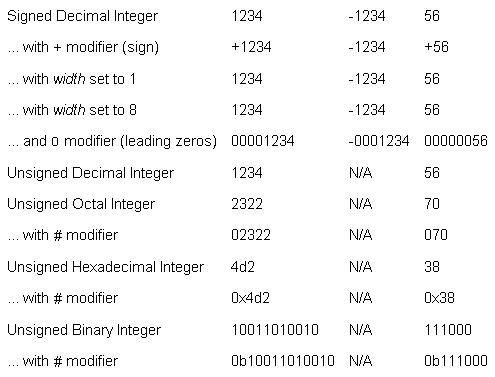
This example shows some of the formatting operations that you can perform on integers.
| Example: Formatting Integers | |
 | |
{let i:int = 1234}
{let j:int = -1234}
{let k:int = 56}

{Table
    columns = 4,
    cell-border-width = 2pt,
    {text Signed Decimal Integer},
    {format "%d", i},
    {format "%d", j},
    {format "%d", k},

    {text ... with {monospace +} modifier (sign)},
    {format "%+d", i},
    {format "%+d", j},
    {format "%+d", k},

    {text ... with {italic width} set to 1},
    {format "%1d", i},
    {format "%1d", j},
    {format "%1d", k},

    {text ... with {italic width} set to 8},
    {format "%8d", i},
    {format "%8d", j},
    {format "%8d", k},

    {text ... and {monospace 0} modifier (leading zeros)},
    {format "%08d", i},
    {format "%08d", j},
    {format "%08d", k},

    {text Unsigned Decimal Integer},
    {format "%u", i},
    {text N/A},
    {format "%u", k},

    {text Unsigned Octal Integer},
    {format "%o", i},
    {text N/A},
    {format "%o", k},

    {text ... with {monospace #} modifier},
    {format "%#o", i},
    {text N/A},
    {format "%#o", k},

    {text Unsigned Hexadecimal Integer},
    {format "%x", i},
    {text N/A},
    {format "%x", k},

    {text ... with {monospace #} modifier},
    {format "%#x", i},
    {text N/A},
    {format "%#x", k},

    {text Unsigned Binary Integer},
    {format "%b", i},
    {text N/A},
    {format "%b", k},

    {text ... with {monospace #} modifier},
    {format "%#b", i},
    {text N/A},
    {format "%#b", k}
}
|
Example
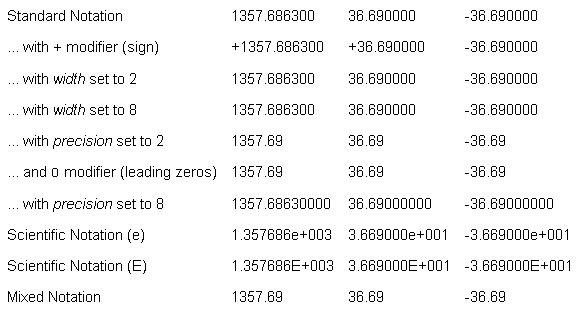
This example shows some of the formatting operations that you can perform on floating point numbers.
| Example: Formatting Floating Point Numbers | |
 | |
{let i:double = 1357.6863}
{let j:double = 36.69}
{let k:double = -36.69}

{Table
    columns = 4,
    cell-border-width = 2pt,
    {text Standard Notation},
    {format "%f", i},
    {format "%f", j},
    {format "%f", k},

    {text ... with {monospace +} modifier (sign)},
    {format "%+f", i},
    {format "%+f", j},
    {format "%+f", k},

    {text ... with {italic width} set to 2},
    {format "%2f", i},
    {format "%2f", j},
    {format "%2f", k},

    {text ... with {italic width} set to 8},
    {format "%8f", i},
    {format "%8f", j},
    {format "%8f", k},

    {text ... with {italic precision} set to 2},
    {format "%.2f", i},
    {format "%.2f", j},
    {format "%.2f", k},

    {text ... and {monospace 0} modifier (leading zeros)},
    {format "%0.2f", i},
    {format "%0.2f", j},
    {format "%0.2f", k},

    {text ... with {italic precision} set to 8},
    {format "%.8f", i},
    {format "%.8f", j},
    {format "%.8f", k},

    {text Scientific Notation (e)},
    {format "%e", i},
    {format "%e", j},
    {format "%e", k},

    {text Scientific Notation (E)},
    {format "%E", i},
    {format "%E", j},
    {format "%E", k},

    {text Mixed Notation},
    {format "%g", i},
    {format "%g", j},
    {format "%g", k}
}
|
Example
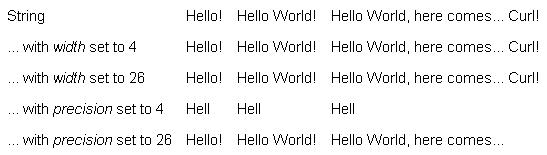
This example shows some of the formatting operations that you can perform on strings.
| Example: Formatting Strings | |
 | |
{let s1:String = "Hello!"}
{let s2:String = "Hello World!"}
{let s3:String = "Hello World, here comes... Curl!"}

{Table columns=4, cell-border-width=2pt,
       {text String},
       {format "%s", s1},
       {format "%s", s2},
       {format "%s", s3},

       {text ... with {italic width} set to 4},
       {format "%4s", s1},
       {format "%4s", s2},
       {format "%4s", s3},

       {text ... with {italic width} set to 26},
       {format "%26s", s1},
       {format "%26s", s2},
       {format "%26s", s3},

       {text ... with {italic precision} set to 4},
       {format "%.4s", s1},
       {format "%.4s", s2},
       {format "%.4s", s3},

       {text ... with {italic precision} set to 26},
       {format "%.26s", s1},
       {format "%.26s", s2},
       {format "%.26s", s3}
}
|
Example
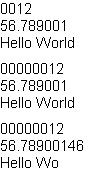
This example shows the use of variable and .
| Example: Formatting With Width and Precision | |
 | |
|| Declare and initialize an int, a float, and a string
{let i:int = 12}
{let f:float = 56.789f}
{let s:String = "Hello World"}

|| Declare an initialize a variable that you can use for
|| the width and precision
{let v:int = 4}

|| Format and output the int, float, and string using a
|| variable width
{format "%0*d", v, i}
{br}{format "%*f", v, f}
{br}{format "%*s", v, s}

|| Change the value of the variable width and display
|| the int, float, and string
{set v = 8}
{format "%0*d", v, i}
{br}{format "%*f", v, f}
{br}{format "%*s", v, s}

|| Use variable precision
{format "%0.*d", v, i}
{br}{format "%.*f", v, f}
{br}{format "%.*s", v, s}
|
Example
This example demonstrates the ability to specify a rest argument index for each format specifier.
| Example: Specifying Format Argument Indexes | |
 | |
|| Output a string with two formatting characters:
||  - A string %s.
||  - A decimal number with a 2-digit width.
{format "The %s concerns how computers deal with the year %02d", "Y2K problem", 0}

|| Output the same string; this time specifying the
|| rest arguments.
{format "The %1!s! concerns how computers deal with the year %2!02d!", "Y2K problem", 0}

|| And finally, mix things up a bit.
{format "The %2!s! concerns how computers deal with the year %1!02d!", 0, "Y2K problem"}
|
Notes
In the C/C++ programming languages, the printf format specifiers (from which ours were adopted) also have a specification (h, l, L, or sometimes q) for the size of the item being formatted. For compatibility, Curl accepts any number of these codes in a format specifier, but simply ignores them completely.
Curl does not support the %n and %p format specifiers that are available in the C/C++ programming languages.
Curl allows %s to be used in ways which would be illegal in the C/C++ programming languages. Note that although %s is often semantically identical to other format specifiers, it is usually much faster, especially when no format modifiers are used.
The output from a format expression includes any spaces produced by the format string itself, or during the formatting, However, if you display the output of a format expression in aTextFlowBox (such as an applet), the whitespace will be collapsed.
Curl does not support the %n and %p format specifiers that are available in the C/C++ programming languages.
Curl allows %s to be used in ways which would be illegal in the C/C++ programming languages. Note that although %s is often semantically identical to other format specifiers, it is usually much faster, especially when no format modifiers are used.
The output from a format expression includes any spaces produced by the format string itself, or during the formatting, However, if you display the output of a format expression in a