Once you have created a Web application in the Curl®
language, you will want to deploy it so your users can run
it. Applets are usually hosted on Web sites. Users who have
installed the Curl® Runtime Environment (RTE) can
browse your site and execute your applets.
You must take three steps to configure your Web site to
serve your Curl applets:
- Add MIME types for Curl files
served from your Web site. The MIME type lets the browser
know the file should be interpreted by
the Curl RTE.
- Deploy a license key.
- If your applets need to access files on a Web site, such as
imported packages, included Curl language source files, and
data files, without asking the user for permission, then you
need to add a curl-access.txt configuration file to
the site, granting the applets access to those resources.
Note: If you are not the administrator of the host that
will serve your applets, you may have to ask the host's
administrator to perform these steps for you.
The terms used in reference to Web sites are often loosely
defined. When you are browsing the Web, you don't need to worry
about the different meanings of these terms. However, to set up
your Web site to serve applets written in the Curl
language, you need to understand the definition of several terms:
- A Web site is a collection of HTML pages, Curl
applets, images, data, and other content that you want to make
available to others. It is the stuff that people come to your
site to see.
- A Web server is the software used to transmit the contents
of the Web site to browsers.
- A host is the computer that the Web server runs on.
-
A host name is the name used to refer to a host or
a Web site. These names, such as www.example.com are the
first portion of a URL ( http://www.example.com/html/demos for example).
-
An IP address is the numeric Internet Protocol address
that identifies a host. This number is usually shown as a
series of four period-separated numbers that range between 0
and 255, such as 192.168.1.1.
| Summary: | - Most applets consist of more than one file.
- Unrestricted access to Web site content can
be a security risk in an Intranet setting.
- Web sites can regulate applet's automatic access to their
files by using a curl-access.txt file.
|
Applets can include other Curl language source files, import
packages, or need access to data files such as XML data. If these
resources are on Web sites, the applet accesses them using the
HTTP protocol.
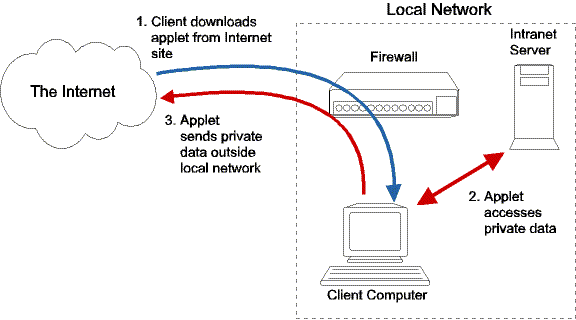
Allowing Curl applets unrestricted access to Web sites can pose a
security risk. In most cases, information available from a Web
server is exposed to the world at large. Intranet servers, which are located on internal networks, and
protected from the outside world by firewalls, may contain data
that should not be exposed to the outside world. In theory, a
malicious Curl applet loaded on a client computer within a local
network could access this sensitive data on an Intranet server and
transmit it to a location outside of the local network.
To prevent a malicious applet from accessing sensitive data, the
Curl language restricts the
silent
access applets have to
Web sites. Silent access is access that takes place without
alerting the user. Applets can silently access only Web sites that
contain a file called
curl-access.txt. This file contains
directives that control which applets can access the site. Applets
cannot silently access Web sites that do not have a
curl-access.txt file, except as noted in
Exceptions to the
curl-access.txt Mechanism below.
Directives in the curl-access.txt file control access
based on the site from which the applet was downloaded. For
example, a site can grant access just to the applets that come
from affiliated sites, or it can restrict access to applets
downloaded from the site itself.
The Curl RTE responds to the curl-access.txt file in the
following ways:
- If the directives in the curl-access.txt grant the
applet access, then the applet's attempt to access the content
file succeeds, and the applet's execution proceeds normally.
- If the curl-access.txt file denies the applet access
to the site's content, then the procedure or method the applet
called to access the file on the server throws a SecurityException.
- If the curl-access.txt file does
not contain a directive the Curl RTE blocks all direct access from
applets and the method or procedure call that attempted to access the
file throws a SecurityException.
- If the Curl RTE does not find a curl-access.txt
file, the applet's attempt to access the content file fails.
The
image text procedure is exempt from some of the
restrictions imposed by the curl access system. Applets can access
images using
image on Web sites that do not have a
curl-access.txt file, as long as the applet hasn't caused too
many security violations to too many different sites. This lets
well-behaved applets have greater flexibility in accessing images.
If a Web site has a
curl-access.txt file, the
image procedure obeys it. If the site's
curl-access.txt
does not grant the applet access, then the
image
procedure fails to get the image. This failure counts as a
security violation against the applet.
Applets can ask the user for permission to access files on a Web
site using procedures such as
choose-file. This method of
file access is not limited by the curl access mechanism, since the
user explicitly approves the access. See the
Dialog Procedures
chapter for more information.
Privileged applets are also not subject to curl access
restrictions. See the
Security chapter for more about privileged applets.
Since the curl access mechanism is primarily aimed at protecting
Intranet sites, the configuration for publicly-accessible Internet
Web sites is fairly simple. Your curl-access.txt file
should have the following content:
    # curl-access.txt for an Internet Web site
    version: 2.0
    allow-all:
Note: There is no relation between the version number of the curl-access.txt file format and the Curl API version number, so
version 2.0 of the curl-access.txt file format has
been used with several different API versions.
This single directive grants access to all applets, no matter what
Web site they came from. This directive should not be used on a
Web site which users log into with HTTP authentication or cookies.
In this case, an applet from an unrelated site could access the
site using whatever HTTP authentication or cookies a user
currently has. Such Web sites should use a more restrictive
directive in the curl-access.txt file.
If you place this file at the root of your Web site, so it
is accessible by the URL http://your-site-name/curl-access.txt, the Curl RTE can
quickly verify that your entire site is accessible to Curl
applets. You do not have to take any further steps to allow
applets access to the site.
Often you are not able to place a curl-access.txt file at
the root of your Web server. For example, you do not have access
to the root directory of shared community Web sites, such as
Geocities and Tripod®. In such
situations, you need to place a copy of the curl-access.txt file in each directory that your applets need to
access.
For example, assume you have a personal Web site on your ISP's
server with the URL:
http://www.example.net/users/joesoap/
Suppose your applets import packages from a directory called packages on your site, and access data files from a directory
called data. You would need to create two copies of the
curl-access.txt file, one for packages and
one for data. So, these files would be accessible as:
http://www.example.net/users/joesoap/packages/curl-access.txt
and
http://www.example.net/users/joesoap/data/curl-access.txt
Note: You do not need a copy of the curl-access.txt file
in the directory that contains the main applet files
themselves. The curl access mechanism only affects the applet's
ability to access files on your server. It has no effect on the
Curl RTE's ability to access the main .curl file of your
applet. If your applet is self-contained and doesn't import
packages, include files, or access data files other than images,
you do not need to create a curl-access.txt file at all.
The allow-all directive must only be used by publicly
accessible Web sites that users do not log in to. You must never use this directive on Intranet servers or servers that
users log in to. Doing so would potentially allow unauthorized
applets to access the data on Web server, which could result in
private information being transmitted to third parties outside of
the Intranet. See the next section for details on how to create
curl-access.txt files for Intranet sites.
Intranets are networks internal to an organization that are
protected from outside access. An Intranet can consist of private
network connections that are protected by firewalls. They can also
consist of connections made via virtual private networks (VPNs)
which encrypt data sent across the public Internet to protect it
from unauthorized access.
When configuring your Intranet Web sites using curl-access.txt files, you need to ensure that name
resolution within the Intranet relies on internal DNS
servers. Relying on a publicly-accessible DNS server to
resolve names in your private network opens your network to
DNS spoofing, which can reduce the protection afforded by
the curl access mechanism.
Curl applets need to be able to access support files, such as the
applet manifest, from the host machine for the applet. The host
must have a curl-access.txt file in place that grants
access to itself, so that when an applet requests additional
resources, the Curl RTE can verify that the applet is allowed to
access the server. The curl-access.txt file must list all
forms and aliases for the machine name that can appear in the URL
used to load the applet.
The curl-access.txt mechanism does not replace any other
security measures on your Web site. It is a mechanism you use in
addition to your site's other security mechanisms, if any. Once all of the
site's other security checks have been satisfied, curl-access.txt
controls which Curl applets can access your site.
For example, if your Web site, www.example.com, only
allows access from clients in the example.com and the
curl.com domains, an applet that was downloaded from your
Web site by a client host in the sample.com domain cannot
access files in your Web site even though the curl-access.txt file might permit it to do so.
You have two options in placing the curl-access.txt file:
- If you want all of the files on your Web site to be subject to
the same access rules, you should create a curl-access.txt file in the Web site's root (for example,
http://www.example.com/curl-access.txt).
- If you want just certain directories to be subject to an
access directive, place a copy of the curl-access.txt
in each of those directories. The curl-access.txt
file's directives affect files in the directory where it is
located, but not its subdirectories.
Since the Curl RTE always looks at the root of the Web site first,
a curl-access.txt file in the root overrides any files
located in subdirectories in the server.
A curl-access.txt file is a standard ASCII text file. You
can create it using the Curl IDE, or any standard
text editor.
A
curl-access.txt file can be empty except for a
version
directive. A
curl-access.txt file with only a
version
directive prevents all access to a Web site. See
Restricting All Access to a Web Site
for more details.
A curl-access.txt has the following syntax:
| Syntax: | version: version-number
directive: [host & domain list]
[directive: [host & domain list]]+
|
|
|
| version-number | is the version of directives used in the curl-access.txt file. Currently, the version is 2.0. |
| directive | is the rule used to define which applets can access the
Web site's files. See below for details. |
| host & domain list | is a comma-separated list of host and domain names passed
to the directive. Each directive handles the names you
pass it differently |
|
In addition, a curl-access.txt file can contain comments,
which are prefixed by a pound sign (#). Comments must be on their
own lines.
A simple curl-access.txt looks like this:
    # A sample curl-access.txt file for a simple Web site.
    version: 2.0
    home-hostnames: www.example.com
The curl-access.txt file can contain only one type of
directive. However, multiple occurrences of the same directive
can occur in the file. This allows you to group the directives
together for readability. The valid directives are:
| Directive: | allow-all: |
| Description: | Grants all applets access to the Web site's content. This
directive should only be used for publicly available
Web sites. Using this directive for an Intranet site exposes
the site's content to potential theft. |
| Example: |
|
| Directive: | allow: host-or-domain [, host-or-domain]+ |
| Description: | Grants access to the named hosts and domain
names. Domain names must be specified with a wildcard character in
place of the initial host name (for example, *.example.com). |
| Example: |
allow: *.example.com, foo.otherexample.com
allow: bar.otherexample.com
|
|
|
| Directive: | allow: host-or-domain [, host-or-domain]+
except: host [, host]+
|
| Description: | Grants access to all hosts and domains listed in the one or
more allow directives, except the hosts
named in the except directives. The except
directives should be on separate lines than the allow
directives. This pair of directives is useful to allow applets
downloaded from your internal sites to have access to the Web
site's data, but exclude applets downloaded from your
publicly-accessible Web sites. |
| Example: |
allow: *.development.example.com
except: www.development.example.com
allow: *.sales.example.com
except: demo.sales.example.com, www.sales.example.com
|
|
|
| Directive: | home-hostnames: own-host-name [, alias]+ |
| Description: | Grants access only to the applets hosted by the site itself.
The own-host-name must be the Web site's own host
name. Any other aliases or abbreviations that users can use
to access the Web site should be included as an alias. |
| Example: |
| home-hostnames: myserver.example.com, myserver |
|
|
Note: You can use the curl-access.txt file to control access
to the https:// scheme by using http://host or https://host in
any directive that specifies a host name, for example https://*.example.com. Such directives match applets loaded from
the scheme as well as the host.
Which directives you use depends on how restrictive you want to
be. The following sections explain how you could use each
directive to configure your internal Web sites.
Applets loaded from the disk of the client computer (for example,
an applet that has been detached from an e-mail message and saved
on the user's computer) can access Web sites, depending on the
configuration of the system and of the site. You should take this
into consideration when you are creating curl-access.txt
files for your Intranet Web sites.
Sites that use an allow-all directive are always
accessible to applets loaded from a local file, as they are to all
applets. Sites that use home-hostnames directives are
never accessible to applets loaded from a local file, because the
home host for an applet loaded from a client machine is never the
same as the Web site host.
Sites that use allow or allow ... except
directives in their curl-access.txt file may or may not
grant the applet access, depending on how the client computer
reports its own name. If the system call that the Curl language
uses to access the system's name returns a full domain name (such
as mymachine.example.com), then the applet will be able to
access any site that grants access to applets hosted on the client
computer (i.e. any site using a directive like allow:
*.example.com). Other types of responses from the system call
will result in the applet having a home host name that will not
pass any allow directives.
Applets loaded from http://localhost URLs
match curl-access.txt directives that specify a hostname
that is the same as the local computer's hostname. If the local
computer's hostname does not include the full domain name, then
the directives in the curl-access.txt file need to include
the short version of the hostname.
For example, a short hostname is mymachine, and a full
hostname is mymachine.example.com.
Using a short hostname
in a curl-access.txt file is not safe on a Web server that
is visible outside of your local network, because the short
hostname could match a machine somewhere else that has the same
short hostname.
Administrators can eliminate this issue by naming all computers
with full hostnames. If this is not possible, servers that need to
allow access from applets loaded from http://localhost
URLs must list the short hostnames of the relevant
computers in their curl-access.txt files. Such servers must not be
visible outside of the local network.
The following example lists both short and full hostnames.
    # curl-access.txt file
    # Only allow own applets access
    version: 2.0
    home-hostnames: mymachine.example.com, mymachine
The following examples show you curl-access.txt files for
the most common Intranet Web site configurations. In many cases,
you will be able to start with the samples here, and simply
replace the host and domain names with the names from your own network.
Each of these examples deal with a specific Web site on your
network. In many cases, you will have some Web sites you will want
to have accessible to all of your Intranet's applets, and some you
will want to restrict. You can make your Intranet most secure by
limiting access as much as possible.
Applets can use the
image text markup to include images
from servers without a
curl-access.txt file. You can
prevent this kind of access by creating a
curl-access.txt
file with just a
version directive. When the Curl RTE
finds a
curl-access.txt file on a site, it prevents all
automatic file access, including images. With a
curl-access.txt
file with only a
version directive, only user-approved access
is allowed to access the site.
A curl-access.txt file with just a version directive
may also contain comments as needed, such as:
    # This file here to prevent access by Curl applets.
    # Do not delete it!
    version: 2.0
You may have a Web site in your Intranet that you want to make
accessible to applets hosted on one or more other Web sites. For
example, if you have Web sites for regional offices, you may want
the applets hosted on them to be able to access a single, central
Web site that contains a database. To do this, you will create a
curl-access.txt for the central Web server that uses the
allow: or allow: ... except: directives.
In this configuration, a user in one of the regional offices will
load the applet from his or her local Web site. At some point, the
applet will attempt to read a file from the central Web
site. Before allowing the access, the Curl RTE will contact
the central Web site, and search for a curl-access.txt
file. The file for the central Web site will need to grant
access to applets downloaded from the regional Web sites for the applet
to be able to access the data it needs.
For example, suppose that Example Co. has four regional Web sites:
- north.example.com
- south.example.com
- east.example.com
- west.example.com
Example Co. also has a single Web site ( central.example.com) that contains a database to which applets
hosted on the regional site must have access.
There are several different curl-access.txt files that
Example Co. could use on central.example.com to grant
the access the applets need.
The simplest, but least secure, curl-access.txt file
would be:
    # central.example.com curl-access.txt file
    # Allow the entire example.com domain
    version: 2.0
    allow: *.example.com
This configuration file should only be used if there are no other
Web sites hosting Curl applets on the example.com network
besides the regional servers. If any Curl applets are deployed on
other servers at a later date, then those applets would also have
access to central.example.com's content.
A more secure curl-access.txt file for example.com's
network would be:
    # central.example.com curl-access.txt file
    # Allow just the regional servers
    version: 2.0
    allow: north.example.com
    allow: south.example.com
    allow: east.example.com, west.example.com
This configuration ensures that if another Web site on example.com's network were to deploy Curl applets, those applets
would not automatically get access to the contents of central.example.com.
Another approach to limiting access to the central.example.com Web site is to grant access to all applets
served from Intranet sites, with the exception of specific
sites. For example, example.com may decide to allow their
many regional Web sites access to central.example.com, but
exclude inappropriate sites, such as the publicly-accessible
www.example.com. Such exclusion-based restrictions can be
done using the allow: ... except: directive:
    # central.example.com curl-access.txt file
    # Allow all servers except publicly accessible ones
    version: 2.0
    allow: *.example.com
except: www.example.com Often, one of your Intranet Web sites hosts its own applets and
contains content to which no other site's applets should have
access. In these cases, you should only allow the site's own
applets to access it. You create this restriction by using the
home-hostnames directive.
The home-hostnames directive accepts a list of host names
that are aliases for the Web site. When the Curl RTE reads a curl-access.txt file with home-hostnames directives in
it, it will only allow the applet to access the Web site (the
target host) if the site is the applet's home
host (it is the Web site from which the applet was downloaded).
The Curl RTE determines that the Web site to which the applet is
trying to connect is the applet's home host by comparing the
names in the directive to the name of the applet's home host.
In addition to matching host names, the Curl RTE ensures that the
host an applet is trying to contact is actually its home
Web site by comparing the IP addresses of the home and target hosts.
The Curl RTE performs a DNS lookup of the home name and the host
name of the target Web site and compares the results. The Curl RTE
will only let the applet access the target host if the target host
IP address matches the home host name's IP address.
Note that home-hostnames also allows access for an
applet loaded from a URL that contains the IP address of the host,
even though the IP address is not listed in the home-hostnames directive.
When a Web site has several hosts serving its contents, a DNS
lookup can return several IP addresses. In cases where multiple IP
addresses are returned for the DNS lookup on the target and home
host, the target host's list of IP addresses must be a subset of
the list of IP addresses for the home host.
For example, suppose a Web server on example.com's
Intranet (private.example.com) serves content that only
its own applets should be able to access. This Web server should
have a curl-access.txt file that uses home-hostnames directive to grant access to only its own applets.
    # private.example.com curl-access.txt file
    # Only allow own applets access
    version: 2.0
    home-hostnames: private.example.com, private
In the above file, the full host name of the server is given in
the home-hostnames directive. The alias private is
also included, since users are able to access the local Web site
without using the domain name. The home-hostnames directive
must contain all of the aliases and abbreviations users might use
to load the applet.
The curl-access.txt file also affects the socket
connections applets can make. However, the access that can be
granted to applets which open socket connections is much more
limited:
- The Curl RTE will only allow socket connections to the applet's
home host. If the applet attempts to open a socket connection
to any site other than the one that served it, the Curl RTE
blocks the connection.
- The Curl RTE will always contact a host's default Web site to
look for a curl-access.txt file. The default Web site
is the one reached when entering the host's IP address into a
browser.
- The Curl RTE will only look in the root directory of the Web server.
This ensures that the curl-access.txt file was set up by
the site's administrator. Only the administrator of the host should
decide whether applets can access ports on the host.
- The only valid directive for socket access is home-hostnames since applets are only allowed to make a
socket connection to their home host. If the Curl RTE finds any
other directives in the curl-access.txt file, it
denies the applet access to the host.
The Curl RTE also supports a cross-domain sandbox security model
using policy files named crossdomain.xml, which is
also used by Adobe Flash and related technologies.
When an unprivileged applet tries to access a Web site, if no
curl-access.txt files are found, the Curl RTE checks
for a file called crossdomain.xml in the root
directory of the Web server the applet is trying to access.
A crossdomain.xml file is an XML file that has as its
basic format a root element of cross-domain-policy,
with zero or more allow-access-from elements. The
allow-access-from elements can contain a domain attribute which indicates which applets can access this
server. The allow-access-from elements can also have a
secure attribute. If the secure attribute
is true, an applet must have been loaded via an
https: URL to be allowed to access content on the
server via an https: URL. The default value of
secure is true.
For example:
    <?xml version="1.0"?>
    <cross-domain-policy>
    <site-control permitted-cross-domain-policies="master-only"/>
    <!-- allows accesses from applets hosted on www.example.com -->
    <allow-access-from domain="www.example.com" />
    <!-- allows accesses from applets hosted on example.net or *.example.net -->
    <allow-access-from domain="*.example.net" />
    </cross-domain-policy>
Or for an example file that allows in accesses from any applet:
    <?xml version="1.0"?>
    <cross-domain-policy>
    <site-control permitted-cross-domain-policies="all"/>
    <allow-access-from domain="*" secure="false"/>
    </cross-domain-policy>
| Summary: | - The Multipurpose Internet Mail Extensions (MIME) type
tells browsers to use the Curl RTE to display Curl
files.
- You will need to consult your Web server's documentation
for instructions on adding a MIME type.
|
In order to serve Curl applets from your Web site, you need to add
MIME type definitions for Curl source files to your Web server's
configuration. The MIME type enables the server to tell the
browser that the content should be handled by the Curl RTE. All
of the following MIME type definitions are required to serve Curl
applets using Microsoft® Internet Information
Services (IIS). For other servers, MIME type definitions for
.curl and .dcurl may be sufficient.
-
The .dat extension indicates a Curl
license file. A .dat file can be served with
a MIME type of application/octet-stream.
Other MIME types could be used for .dat, but
IIS requires that some type be specified.
-
The .curl extension indicates a Curl applet file
that can be run in a browser. A .curl file should
be served with a MIME type of text/vnd.curl.
-
The .dcurl extension indicates a detached
applet file that can be run as a stand-alone
application. A .dcurl file should be served with a
MIME type of text/vnd.curl.dcurl.
-
The .scurl
extension indicates a Curl source code file, which defines
packages and the code included in packages. A .scurl
file should be served with a MIME type of text/vnd.curl.scurl.
-
The .mcurl extension indicates a Curl manifest
file, which organizes application resources. A .mcurl
file should be served with a MIME type of text/vnd.curl.mcurl.
-
The .pcurl extension indicates a
pre-compiled Curl package. A .pcurl file
should be served with a MIME type of application/vnd.curl.pcurl.
-
The .car extension indicates a Curl
archive file, which is used by the Curl Occasionally
Connected Computing feature. A .car file
should be served with a MIME type of application/vnd.curl.car
Note: Microsoft® Internet Explorer is able to
display Curl applets even if the Web server is not configured with
the proper MIME type. This browser uses the .curl extension
of the file being downloaded to determine that the Curl RTE
should handle the file. Other browsers may not use file extensions
to determine if a plug-in should handle downloaded content, and
instead display the source code of the file if the Web server is
not configured with the proper MIME type.
How you add the MIME type depends on the Web server you are
running. For example, for the Apache Web server running on Windows
NT or 2000, you need to edit the file
Path to Apache's Install Directory\conf\mime.types
and add the line:
text/vnd.curl curl
If you are using detached applets (.dcurl) then add the line:
text/vnd.curl.dcurl dcurl
Add additional lines for other Curl file types as necessary.
If you do not have access to the main Apache server configuration file
(as might be the case if you do not own the Web server yourself), then
you can use an .htaccess file to control the MIME type for files
in the directories you control. Place the .htaccess file
containing the following lines in the directory which contains all your
Curl applet files.
AddType text/vnd.curl .curl
AddType text/vnd.curl.dcurl .dcurl
AddType text/vnd.curl.scurl .scurl
AddType text/vnd.curl.mcurl .mcurl
AddType application/vnd.curl.pcurl .pcurl
AddType application/vnd.curl.car .car
The
.htaccess file applies to that directory
and all its subdirectories. More information on the use of
.htaccess files is available at
apache.org.
Please see the documentation for your Web server to determine how to
add a MIME type.
One of Microsoft's Internet Information Server's (IIS)
configuration options can cause issues when serving Curl
applets. IIS has a configuration option that forces all of the
content it serves to expire immediately, so that the content will
not be held in a cache. When an IIS is configured this way,
Internet Explorer (IE) has trouble downloading and executing Curl
applets. Instead of displaying the applet, IE will open a download
file dialog. No matter what the user does with the download
dialog, IE will respond with a file not found
error.
To prevent this problem, do not set IIS to have its content
expire immediately. Any other setting, such as having the content
expire after a few seconds, fixes this issue.
If your Curl Language Web application is hosted on a Web site, you
can configure your Web server to add a Content-Type
charset parameter to the HTTP headers it sends when serving your
files. This parameter lets the client know the encoding of the
HTTP document being sent. The Curl RTE examines the Content-Type
parameter to determine the character encoding of the
text in the file, unless the file contains a
curl-file-attributes expression that specifies a
different character encoding.
| Summary: | - An HTTP server for Curl applications
must also serve a license key.
- Obtain license keys from SCSK Corporation.
- License keys can be located in either the Web root, or
the directory that contains an application.
|
A license key is a signed binary file provided by
SCSK Corporation. for installation on an HTTP server. A license key on
an HTTP server permits the Curl RTE to run
applications from that server.
You can use http://localhost/... to simulate serving applets
from a Web site. Localhost provides a better testing environment
for Curl applets than the file: scheme. The file: scheme
does not require a license key, and uses the Curl Pro set of
features. Applets using the Free Curl license may behave
differently when run from a file: URL. SCSK Corporation. provides
special license keys that permit local HTTP deployment on http://localhost/... URLs. These keys are part of your Curl
installation, and are located in d:\automated-build-temp\build\win32-atom\ide\etc\localhost\curl-license-5.dat and d:\automated-build-temp\build\win32-atom\ide\etc\localhost-pro\curl-license-5.dat.
A license key must be associated with one or more valid URL(s) that
correspond to the URLs of the applets to be deployed. You specify
these URLs when you request the license key from SCSK Corporation. The
URLs represent the locations of the applets you wish to deploy,
not the IP address of the server. If you want to license all curl
applets on a machine, specify the top-level machine name.
For example, the URL http://www.example.com/ licenses
all applets under: http://www.example.com/.
If you want to license curl applets located in a specific
directory, specify the URL to that specific directory.
For example, http://www.example.com/level1/ licenses
all applets in the directory http://www.example.com/level1/, and any subdirectories.
You do not need a license key to access resources as file URLs
during local development. You need a license key when you deploy
Curl applets on HTTP hosts, to be accessed by separate Curl RTE
clients. Information on obtaining license keys for application
deployment is available on the Curl Web site.
You cannot rename a license key file. If you rename the license
key file, the Curl RTE cannot find it.
The URL prefix can be any valid hostname without a
wildcard. However, you must use two hostname components, also
known as DNS labels, following an initial wildcard. These examples
are valid URL prefixes for the purpose of licensing:
    http://example/products/
    http://*.example.com/products/
These examples are not valid URL prefixes for the purpose
of licensing:
    http://*.example/
    http://*/products/
You can place a license key in the Web root directory, or in the
directory that contains the Curl language application.
The Curl RTE looks at the root of the Web site first. If it
finds a license key there, it does not look further, so a license
key in the root overrides keys located elsewhere on the server. If
you have a single license key that covers all of your deployment
locations, this is the most efficient place to put it.
If the Curl RTE does not find a license key in the server's Web
root directory, it looks for a key in the location for the
application it is attempting to download.
For example, for a site with the host name http://www.my-server.net that serves an application located at
http://www.my-server.net/contents/demos/some-Curl-app/start.curl
- the Web root license key is
http://www.my-server.net/curl-license-5.dat,
- the applet-specific license key is http://www.my-server.net/contents/demos/some-Curl-app/curl-license-5.dat.
- If the Curl RTE does not find a license at either
location, it returns an error message.
You might want to deploy license keys on a per-application basis
if you do not have access to your server's Web root, for instance
if you use a location on an ISP's server, or if different entities
publish Curl content on the server at different times, and want to
avoid the need to coordinate a single license key.
Note: The Curl RTE caches HTTP failures when reading the license file.
If you are adding or removing a license file, you should shut down and
restart the Curl RTE after doing the change, otherwise the behavior of the
Curl RTE may be based on the cached values rather than the actual
current files. In particular, this can result in applet failures even
if you have properly placed the license file.
Curl offers restricted-use RTE licenses that limit the number of
users that have access to Curl applets. Restricted-use licenses
require an RTE client license on each client computer. Curl
enforces restricted-use licensing with the SafeNet Sentinel
LM™ licensing software. Please visit the
Curl web
site for information about purchasing licenses and setting up a
network license server.
Restricted-use RTE licenses are available as either standalone
licenses generated for each machine, or as a network license for a
specified number of machines. If you deploy restricted-use
applets, your users need to use the License tab on the
Curl Control Panel to license the RTE on their machines.
If you use a network license, the end user enters the URL of the
network license server or chooses it from a list. If you use
standalone licenses, the end user must send a code that identifies
the machine to SCSK Corporation. along with information that identifies
the user and the server and get back a license code. A field on
the License tab displays the code that identifies the
machine. The Request Standalone License button opens a
page on the Curl web site that enables users to request a license
key.
When you use a network license, additional fields on the License tab enable the user to select a machine to act as the
network license server.
When the RTE is licensed, the License tab provides a Release License button that users of network licenses can use to
release their license for use by others. The RTE must be shut down
before the license is released.
If users browse an applet that requires a license while using an
unlicensed RTE, they get an uncaught exception error in the
applet. The text of the error explains the situation. The applet
author can handle this exception and provide additional
information to the user if desired.
Copyright © 1998-2019 SCSK Corporation.
All rights reserved.
Curl, the Curl logo, Surge, and the Surge logo are trademarks of SCSK Corporation.
that are registered in the United States. Surge
Lab, the Surge Lab logo, and the Surge Lab Visual Layout Editor (VLE)
logo are trademarks of SCSK Corporation.