| Summary: | - Regular expressions let you determine if a string
conforms to a certain pattern.
- These expressions are useful for parsing user
input and data files that need to conform to a certain pattern.
- Because its high-level regular syntax is adopted from the programming
language, Perl, the Curl® language is suitable for many different types
of data extraction and reporting tasks.
|
Regular
expressions let you determine if a string conforms to a
certain pattern. You define a pattern using the regular expression
syntax you then compare strings against it. Strings that conform to the
pattern are called matches.Regular expressions are useful for parsing user input and data files
that need to conform to a certain pattern. For example, valid social
security numbers and phone numbers both conform to a specific
pattern. Regular expressions make it easy to both verify that the
number is in the proper format and to easily extract and manipulate
the data. The regular expression syntax is flexible, allowing you to
accept several different valid patterns with one expression. For
example, you can write a single regular expression that recognizes
phone numbers in formats used in the United States
((nnn) nnn-nnnn), Great
Britain (nnnn nnn nnn), and France (nn.nn.nn.nn.nn).The Curl language's high-level regular expression syntax is adopted from the
programming language Perl. This makes the Curl language suitable for many different
types of data extraction and reporting tasks.The syntax used to create regular expressions is unlike the Curl language's native
syntax and can get fairly complex. The following sections explain the
basic concepts of regular expressions and include interactive
examples. The examples show the regular expression at the top, and
below show the results of comparing the regular expression to several
strings. You can edit the regular expression and the strings it
matches to experiment on your own with regular expressions. Click the
Update button that appears after you edit one of the fields to
update the results of the example. If you want to get back to the
original example after changing the regular expressions or strings,
click Restore.You can find examples on how
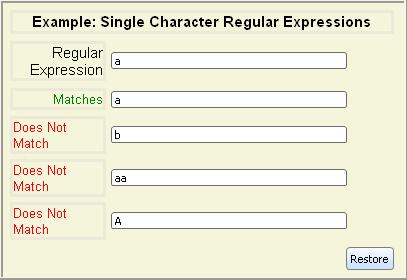
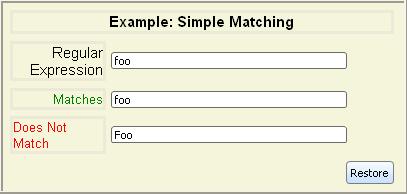
to use regular expressions later in this section.The simplest possible regular expression is one containing just a single
alphanumeric character. It matches strings containing just that character.
Single-character regular expressions are case sensitive.
There are a number of special characters used in the regular
expression syntax.
If you wish to use them as characters in a regular expression,
rather than using their special meaning, you need to
escape them using the backslash character (\). The characters you
need to escape include \, |, {, }, +, *, (, ), ., ^, $, and ?.
When you specify regular expressions in applets, remember that some
regular expression special characters are also reserved characters in
the Curl language. See Reserved Characters. In
the following example, note that you must escape the backslash in
order to create a regular expression that matches the dot character
(.).
| Example:
Regular Expression in an Applet |
 |
{import * from CURL.LANGUAGE.REGEXP}

{let s:String = "abc ... def"}
{let exp:String = "\\."}
{set s = {regexp-subst
             exp,
             s,
             "",
             replace-all? = true}}

{value s}
| |
The following example uses verbatim strings to include reserved
characters in a string and a regular expression. See Verbatim
Strings.
| Example:
Verbatim Strings and Regular Expressions |
 |
{import * from CURL.LANGUAGE.REGEXP}

{let s:String = |"abc ||| def"|}
{let exp:String = |"\|"|}
{set s = {regexp-subst
             exp,
             s,
             "",
             replace-all? = true}}
{value s}
| |
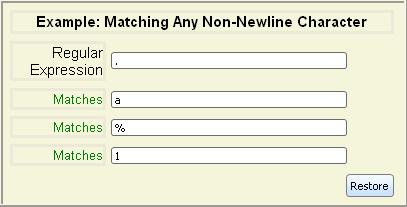
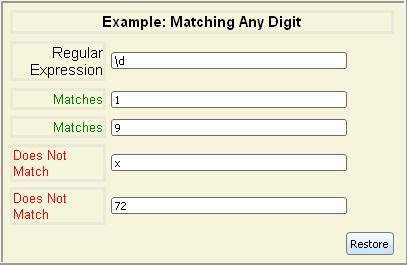
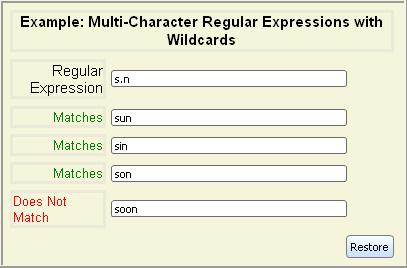
Wildcards let you match a single character that falls into a certain
category, such as digits, letters, and so on. As with
single-character regular expressions, a wildcard only matches a
single character.The wildcards are summarized in the following table:
| Syntax | Meaning |
|---|
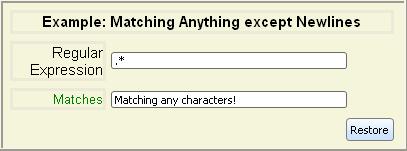
| . | Matches any character except newline |
| \d | Matches any digit character |
| \D | Matches any non-digit character |
| \s | Matches any whitespace character |
| \S | Matches any non-whitespace character |
| \w | Matches any word character |
| \W | Matches any non-word character |
Note: The current
Locale determines which characters are
considered
digits
,
whitespace
, and
word characters
.
In addition to the predefined classes of characters you can match with
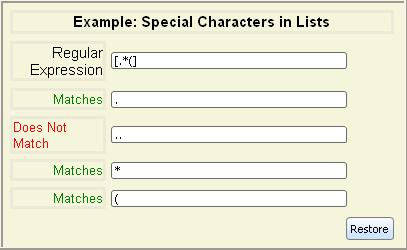
wildcards, you can also specify a list of characters to be matched.To explicitly select the characters to be matched, enclose them in
square brackets ([]). Only the characters in the list
match. These matches are case sensitive.

Note: The following characters are treated specially inside square
brackets: hyphen (-), caret (^), close square
bracket (]), and backslash (\). Hyphen must be
the first character after the opening square bracket or the last
character before the closing square bracket. Caret must not be the first character. The characters backslash and close
square bracket must be escaped with backslash. The close square bracket
does not need to be escaped if it is the first character after the
open bracket (e.g., [][] is equivalent to [\][] and will
match either an open or close bracket). No other character needs to be
escaped to be included within square brackets
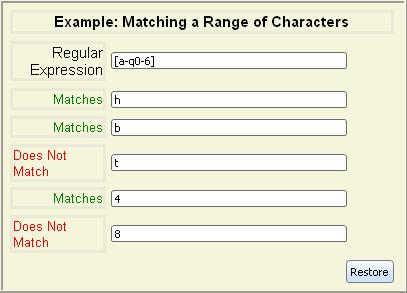
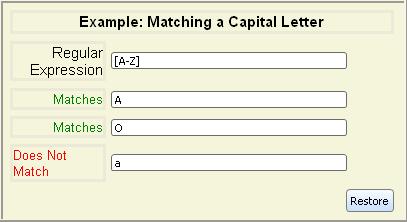
Often, you want to specify a range of characters instead of listing
each character explicitly. You can use a hyphen (-) to specify
a range of characters to match. For example, [a-z] matches all
lowercase letters. To include a hyphen in the wildcard, include it as
the first or last character of the list.
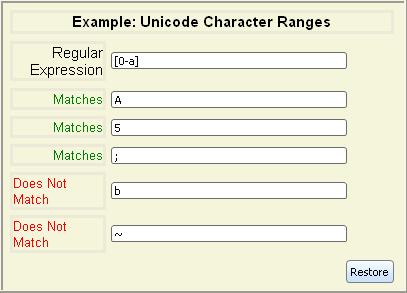
Ranges are based on Unicode values. For example, the character 0
is Unicode value \u0030 and a
is \u0061. The range of [0-a] encompasses all digits 0-9, some
punctuation, all of the uppercase letters A-Z, and the letter a.
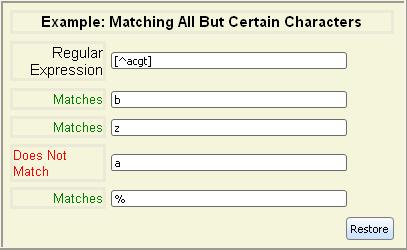
You
can invert a list by including a caret (^) as the
first character in the square brackets. Negated character lists match any
character that is not within the list.
Being able to match just a single character isn't very useful.
Regular expressions that match more than one character are built out of
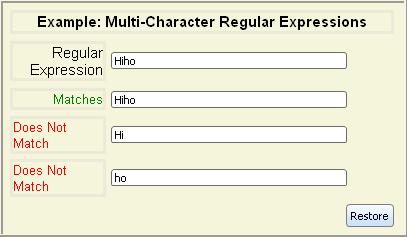
single-character regular expressions using several operators.To match a multi-character string, you can concatenate several
single-character regular expressions together. If each
single character regular expression matches its counterpart in the string,
the string matches.
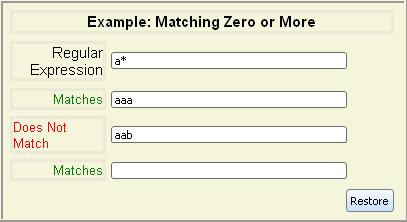
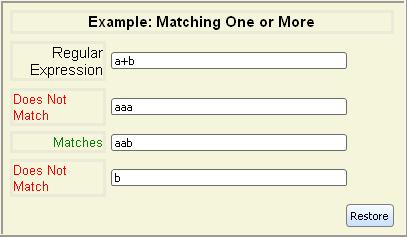
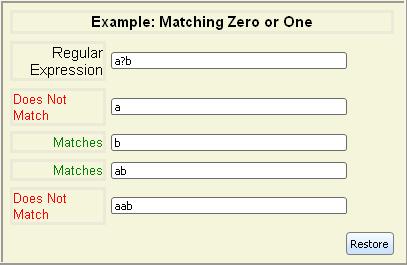
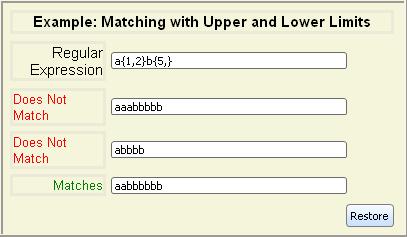
Often, you want to match a string when a pattern appears once or
more. The repetition operators allow the regular expression that
precedes them to match more than once, or even not at all.
| Syntax | Meaning |
|---|
| regexp* | Matches 0 or more consecutive substrings that
regexp matches |
| regexp+ | Matches 1 or more consecutive substrings that
regexp matches |
| regexp? | Matches 0 or 1 consecutive substrings that
regexp matches |
| regexp{m,n} | Matches at least m but no more than
n consecutive substrings that regexp matches |
| regexp{m,} | Matches m or more consecutive substrings that
regexp matches |
| regexp{n} | Matches exactly n consecutive substrings that
regexp matches |
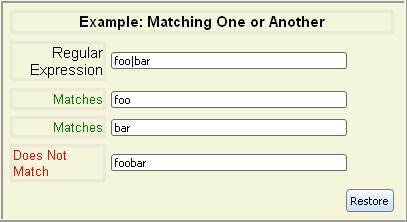
The alternation operator, |, acts similarly to the
or operator in Curl language expressions: it allows one of the
regular expressions on either side of it to match.
| Syntax | Meaning |
|---|
| regexp1 | regexp2 | Matches any string matched by either regexp1 or
regexp2 |
Like normal Curl language expressions, regular expression operators have
precedence to prevent ambiguity.The regular expression operators in order of highest to lowest
precedence are:- Repetition
- Concatenation
- Alternation
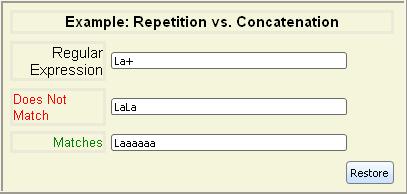
You need to take these rules into account when you create your regular
expressions. For example, since repetition has higher precedence than
concatenation, you cannot simply add a + to the end of a
string of characters and expect the resulting regular expression to
match one or more instances of the string. The + operator
applies to just the last character in the string, since it is evaluated
before the last character's concatenation with the rest of the string.
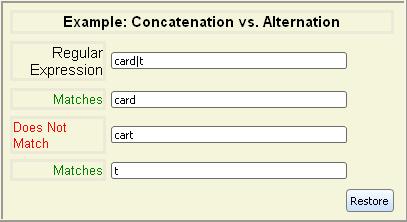
Similarly, concatenation takes precedence over alternation, so strings
are concatenated before the alternation operator is
applied. This means that you cannot use the alternation character to
select one of two letters to appear in a string.
As with Curl language expressions, you can use parentheses to control
precedence within a regular expression to group lower-precedence
operations together. For example, using parentheses around a string to
ensure that the entire string is concatenated before being
affected by any operator, such as + or *.

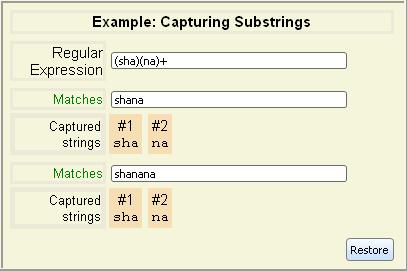
Note that the previous example lists Captured strings
in addition to
Matches
. Captured strings are substrings that match the part of the
regular expression contained between a pair of parentheses. These captured
substrings can be extracted or reused elsewhere in the expression. Expressions
that use modifier flags do not capture substrings. See the example Capturing Substrings with Modifiers.
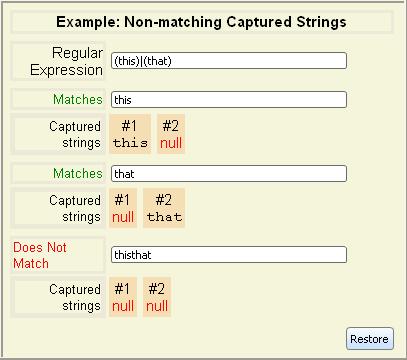
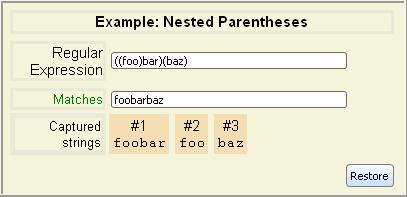
The captured substrings are numbered starting from 1 for the left-most
parentheses. Any parentheses that do not match return
null as their captured substring. However, they are still
numbered. In the case of nested parentheses, the outer parentheses are
numbered before the parentheses they contain.
If the contents of the parentheses can match different strings, and the
parenthetical regular expression can match multiple times within a
string, the last substring that was matched is returned as the substring captured by the parentheses.

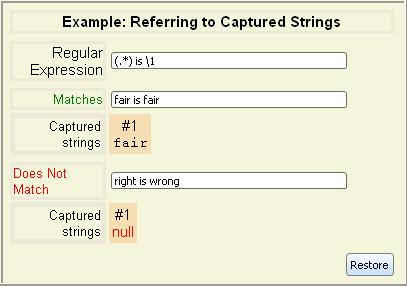
What can you do with a captured string? One use is to refer to the captured
string to require that it appears in another location in a matching string.
You refer back to a captured string with a backslash (\) followed by the
number of the captured string.
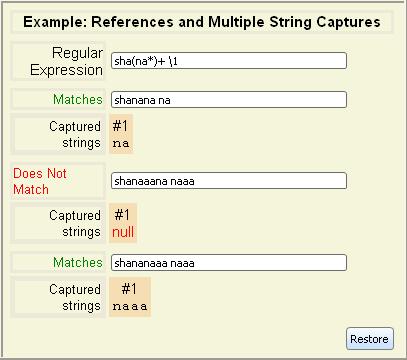
Only the last string captured by a parenthetical expression is
available in a backreference.
You can name string capturing expressions by inserting ?P<name> after the opening parenthesis, where name is
any valid Curl identifier. For example, the following gives names to the
variable parts of an expression that matches an ISO formatted date string.
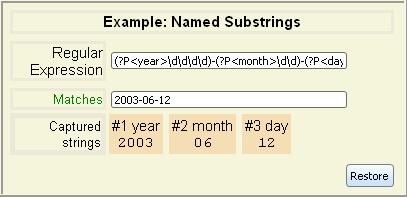
In addition to serving to document the regular expression, such names can be
used to refer to the captured substring in place of its numeric
backreference index. This is especially useful when working with Matcher and MatchState objects, as in the following example.
See Matcher
and MatchState.
| Example:
Accessing named substring through a MatchState |
 |
{import * from CURL.LANGUAGE.REGEXP}
{value
    let matcher:Matcher = {Matcher |"<(?P.*)>"|}
    {if-non-null state = {matcher.match ""} then
        state["name"]
     else
        "NO-MATCH"
    }
}
| |
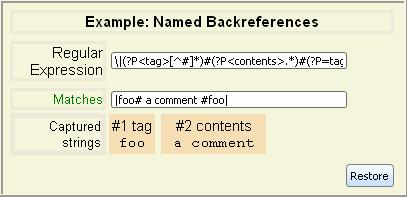
The syntax for referring to a named substring earlier in the same regular
expression is (?P=name). For example, the
following shows an expression that matches a Curl tagged comment. Here
(?P=tag) is equivalent to writing \1.
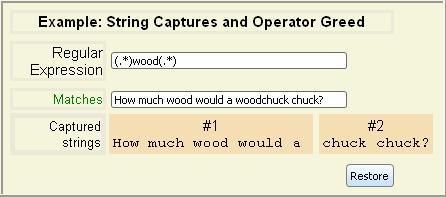
Multiplier operators, such as *, which allow a regular
expression to match multiple times are greedy.
They match as
much of the string as they can, even if other portions of the regular
expression could match some of the characters. This has an impact on
string captures, since a multiplier may consume more of a string than
you intended.
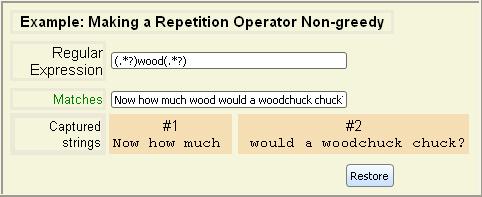
You can make repetition operator be non-greedy
by appending a
question mark (?) to it.
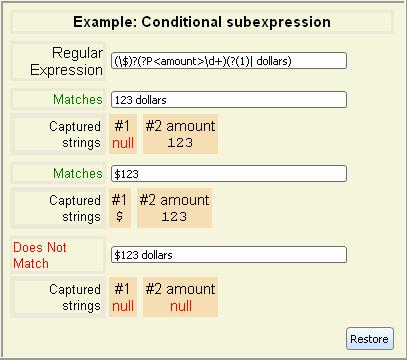
You can define a subexpression that is conditional upon whether a previous
captured substring match was successful.
| Syntax | Meaning |
|---|
| (?(n)yes|no)) | Matches against regular expression yes if the
nth captured subexpression was matched,
and otherwise matches against no. |
| (?(n)yes) | This is equivalent to
(?(n)yes|)) |
Note that n must be in the form of an integer without a leading
backslash and thus differs from a normal backreference. There is currently
no support for referring to the captured subexpression by name.
Here is a regular expression that parses a dollar amount and only looks for
"dollars" suffix if missing "$" prefix:
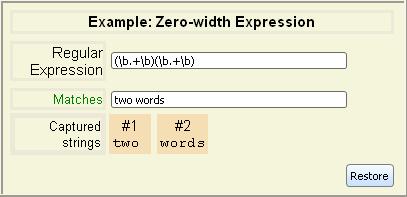
In addition to regular expressions that match characters, there are a
class of regular expressions that match certain positions within a
string. Since they do not actually match characters, they are called
zero-width regular expressions. You use them to anchor
a
part of the regular expression, ensuring that it falls within a
specific location in the string, such as the beginning or end of a
line.Several built-in zero-width expressions are available:
| Syntax | Meaning |
|---|
| ^ | Matches the emptiness just before the beginning of a
line. |
| $ | Matches the emptiness just after the end of a line, or
just before the newline at the end of the string. |
| \A | Matches just before the beginning of the string. |
| \Z | Matches just after the end of the string, or before a
newline at the end of the string. |
| \z | Matches just after the end of the string. |
| \b | Matches a word boundary; that is, the emptiness between
any word character and any non-word character.
(The non-existent characters beyond the beginning and end
of the string are treated as non-word characters.) |
| \B | Matches any emptiness not matched by \b. |
You should note the difference between the beginning and end of a
line and the beginning and end of a string. If a
string contains new line characters, then it has several lines within
it. Therefore, it has several beginnings and ends of a line. A string
only has one beginning and one end.
In addition, you may construct custom zero-width expressions:
| Syntax | Meaning |
|---|
| (?=regexp) | A zero-width positive lookahead assertion. Matches the
emptiness just before any substring matched by
regexp. |
| (?!regexp) | A zero-width negative lookahead assertion. Matches the
emptiness just before any substring not matched by
regexp. |
| (?<=regexp) | A zero-width positive lookbehind assertion. Matches the
emptiness just after any substring matched by
regexp. |
| (?<!regexp) | A zero-width negative lookbehind assertion. Matches the
emptiness just after any substring not matched by
regexp. |
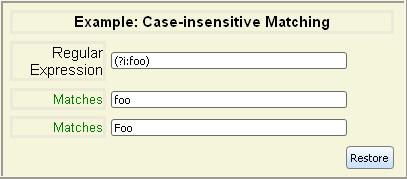
There are three modifier flags
which may be applied to
any regular expression:
| Modifier flag | Meaning |
|---|
| i | Do case-insensitive matching. |
| m | Treat string as multiple lines. That is, allow ^ and $ to match after and before any
newlines the string contains, not just at the
beginning and end of the string. |
| s | Treat string as a "single line". That is, allow "." to
match any character including newline. |
All of these modifiers are disabled by default.To apply one or more of these modifiers, use the generalized grouping
construct:
| Syntax | Meaning |
|---|
| (?mods-antimods:regexp) | Apply mods and remove antimods from
regexp. Note that mods, antimods,
and the minus sign between them are all optional. |
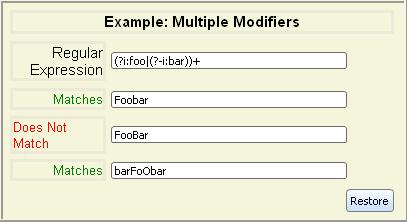
When multiple modifiers are applied to (or removed from) a regexp, the
innermost modification takes priority.
As you can see in the previous examples, modifier expressions do not
capture substrings. This behavior avoids the extra computational cost
required to capture the substring. You can use an expression of the
form (?:regexp) in place of (regexp) if you are concerned about performance and do not need to
capture the group expression's substring. If you do want to capture a
substring from a modifier expression you must add an extra set of
parenthesis.

Now that you know how to create regular expressions, it's time to use them
within the Curl language.Before using regular expressions in the Curl language, you must import the regular
expressions package using import:{import * from CURL.LANGUAGE.REGEXP}
Note: Escaping your regular expressions to prevent the runtime
from interpreting them is in addition to any escaping you do to
prevent your regular expression from interpreting special
characters.
Making your regular expressions verbatim text is easiest way to
prevent the runtime from accidentally interpreting parts of them. The simplest
way to form a verbatim text string is to enclose the regular
expression in |" and "| rather than regular quotation marks.
See the Basic Syntax section for instructions on how to use verbatim strings.The standard method of escaping special characters using
the backslash character (\) also works; however, it can get
cumbersome. This is especially true if you want to include the
backslash character as a character to be recognized in a regular
expression, as you need to type four backslashes \\\\. Using
verbatim strings prevents your regular expressions from becoming
totally unreadable.The simplest procedure for using regular expressions is regexp-match?. This procedure takes a StringInterface containing a
regular expression and a StringInterface to be matched. It returns a
bool indicating whether any part of the string matched the
regular expression.
| Example:
Matching a String |
 |
{import * from CURL.LANGUAGE.REGEXP}
{regexp-match? "foo", "Hello foobar goodbye"} | |
The regexp-match? procedure can also extract any substrings
captured by the regular expression, and store them in variables that
you give it.
| Example:
Extracting Substrings |
 |
{import * from CURL.LANGUAGE.REGEXP}
{value
    let beg:#String, mid:#String, end:#String
    || Match "foo" within a string. Capture the
    || result in three strings. No need to use verbatim
    || strings here, since the regexp doesn't contain characters
    || that have special meaning in the Curl language.
    {if {regexp-match? "^(.*)(foo)(.*)$", "Hello foobar goodbye",
                       beg, mid, end} then
        {HBox {HBox border-width=1pt, border-color="red", beg},
              {HBox border-width=1pt, border-color="green", mid},
              {HBox border-width=1pt, border-color="blue", end}}
     else
"No match"}} | |
The following example shows how you might verify that a phone number
is valid (in the format (nnn) nnn-nnnn or something similar) and at the same time extract each
portion of the number.
| Example:
Matching a Phone Number |
 |
{import * from CURL.LANGUAGE.REGEXP}
{value
    let ac:#String, ex:#String, pn:#String
    let stat:Graphic = {Fill}
    let phone-field:TextField =
        {TextField width=2in,
               {on ValueChanged do
                   || See if the current contents are in an
                   || acceptable format, and if so, show
                   || the components of the phone number
                   {if {regexp-match? |"^\(?(\d{3})\)?[\s.]*(\d{3})[\s.\-]*(\d{4})\s*$"|,
                                       phone-field.value, ac, ex, pn} then
                       || The phone number is in the proper format, so show it in
                       || the result area.
                       set stat = {stat.replace-with {HBox {text color="green", Valid },
                                               {text Area Code: {value ac},
                                                   Exchange: {value ex},
                                                   Phone Number: {value pn}}}}
                       || The current phone number is not valid, so show that
                       || it is currently invalid.
                       else set stat = {stat.replace-with {text color="red", Invalid}}}}}
    {VBox {HBox valign="origin",
                 {text Phone number:}, phone-field},
          {HBox stat}}
}
| |
The regular expression in the previous example is:^\(?(\d{3})\)?[\s.]*(\d{3})[\s.\-]*(\d{4})\s*$The following table explains each section of the regular expression.
| Expression | Explanation |
|---|
| ^ | Matches the start of the string. |
| \(? | Zero or one left parenthesis. |
| (\d{3}) | Zero or one instances of three digits (for the area
code, which is optional). The matching digits are
captured. |
| \)? | Zero or one instances of a right parenthesis. |
| [\s.]* | Zero or more occurrences of any whitespace character or
period. |
| (\d{3}) | Three digits (for the exchange). These are required
and captured. |
| [\s.\-]* | Zero or more instances of whitespace, period, or
hyphens. |
| (\d{4}) | Four digits of the phone number. These are required,
and captured. |
| \s*$ | Zero or more whitespace characters, then the end of the
string. |
The regexp-subst procedure lets you replace substrings that
match a regular expression with a pattern. It takes a regular
expression, an input StringInterface, and a replacement template.The replacement template is a StringInterface that can contain
literal characters and references to substrings captured by the regular
expression. Literal characters are added to the replacement substring as-is.
The references to substrings captured by the regular expression have the same
format as references in the regular expression syntax. The first
captured string is referenced as \1, the second as \2, and so on. If there
are more than nine references, put the reference number in parentheses. For
example: \(10).If there were no captured substrings in the regular expression, then the
entire string matched by the regular expression can be inserted in the
replacement string by using \1.
| Example:
Replacing a Matched Substring |
 |
{import * from CURL.LANGUAGE.REGEXP}
{regexp-subst "foo", "The food was good", "bar"} | |
By default, regexp-subst replaces just the first substring
that matches the regular expression. The replace-all? optional
argument causes all matching substrings to be replaced.
| Example:
Replacing All Instances of a Substring |
 |
{import * from CURL.LANGUAGE.REGEXP}
{regexp-subst "dbl-(.)", "dbl-x dbl-y dbl-z", "\\1\\1",
    replace-all?=true}
| |
You can reference named substrings using the syntax (?P=name) as described in the section Named Substring Groups.
| Example:
Replacing named substrings |
 |
{import * from CURL.LANGUAGE.REGEXP}
{regexp-subst
    |"(?P\d\d\d\d)-(?P\d\d)-(?P\d\d)"|,
    "2003-10-11",
    |"(?P=month)/(?P=day)/(?P=year)"|
}
| |
The
Matcher class lets you create a compiled regular
expression to use repeatedly. Creating a
Matcher
increases efficiency by avoiding memory reallocation for a regular
expression that is applied many times. The procedures
regexp-match? and
regexp-subst both create a
Matcher from the regular expression parameter if it is supplied
as a
StringInterface. They can also accept a
Matcher object, as the following example illustrates.
| Example:
Using Matcher explicitly |
 |
{import * from CURL.LANGUAGE.REGEXP}
{value
    let my-string:String = "Curl is great, I like Curl"
    let m:Matcher = {Matcher "^Curl.*Curl$"}
    {if {regexp-match? m, my-string} then
        {text Match}
     else
        {text No match}
    }
}
| |
The
Matcher class supports a number of options,
including:
You can set
case-sensitive?,
multiline?,
and
single-line? without using a
Matcher
explicitly with the
i,
m, and
s flags in a
regular expression.
You can access the substrings in the result using either numeric
names or names assigned in the regular expression. The following
example gets the substring captured by the first set of
parenthesis.
| Example:
Using numeric name |
 |
{import * from CURL.LANGUAGE.REGEXP}
{value
    let matcher:Matcher = {Matcher |"<(.*)>"|}
    {if-non-null state = {matcher.match ""} then
        state[1]
     else
        "NO-MATCH"
    }
}
| |
This example assigns the name match-name to the substring.
| Example:
Using assigned name |
 |
{import * from CURL.LANGUAGE.REGEXP}
{value
1        let matcher:Matcher = {Matcher |"<(?P.*)>"|}
    {if-non-null state = {matcher.match ""} then
        state["match-name"]
     else
        "NO-MATCH"
    }
}
| |
The method
MatchState.substitute appends a string
constructed on an output template that can involve contents of the
match. It can be used to perform substitutions, as illustrated in
the following example. The example performs a match, then uses
MatchState.get-range to find the beginning and end of
the matching text in the source string. It then copies everything
before the matched text to the target
StringBuf,
uses
MatchState.substitute to append the substitute text
to the buffer, then appends the text following the match
range. Note that there is no advantage to using
MatchState.substitute rather than
regexp-subst unless
you need to do additional processing on the
MatchState
for each match.
| Example:
Using MatchState.substitute |
 |
{import * from CURL.LANGUAGE.REGEXP}

{value
    let string:StringInterface = "one two three four"
    let m:Matcher = {Matcher "(?Ptwo)"}
    let s:StringBuf = {StringBuf}
    let match-end:int = 0

    {if-non-null state = {m.match string} then
        let (match-start:int, match-length:int) = {state.get-range "match-name"}
        || Prepend everything before the matched range.
        {s.write-one-string
            string, start = match-end, length = match-start - match-end
        }
        || Do the substitution
        {state.substitute "[(?P=match-name) or five]", buf = s}
        set match-end = match-start + match-length
    }

    || Append everything following the last match.
    {s.write-one-string string, start = match-end}
    s
}
| |
Copyright © 1998-2019 SCSK Corporation.
All rights reserved.
Curl, the Curl logo, Surge, and the Surge logo are trademarks of SCSK Corporation.
that are registered in the United States. Surge
Lab, the Surge Lab logo, and the Surge Lab Visual Layout Editor (VLE)
logo are trademarks of SCSK Corporation.