| Summary: | The Curl® language uses several classes to present
and manipulate dates and times.
- Use the DateTime class to represent precise moments
in time.
- Use the DateTimeInfo class to access various elements of
a DateTime.
- Use the Time class to represent a quantity of time.
|
The Curl language uses several classes to represent and manipulate
date and time information. These include:- DateTimeInfo represents calendar information for a
specific moment in time, such as the day of the week, the
week of the year, etc.
- DateTimeData represents a specific moment in time.
- DateTimeZone contains time zone information.
All of these classes can be accessed through a single class: DateTime. For the majority of your work with dates and times, you
will just use the DateTime class.The Curl language also uses the Time class to represent a quantity of
time.
Through the
DateTime class, you can represent precise
moments in time. These moments are stored as seconds since
the
epoch
in a fixed point fraction consisting of a
64-bit integer part and a 64-bit fractional part. The
epoch lies at midnight, January 1st 1970, UTC.
This means that the Curl language can effectively represent dates and times with
infinite range and precision. However, the parsing or display of
these dates and times may be limited to some subset of this range
due to host limitations.
When using a UTC based time zone, you can represent
virtually any date and time.
The UTC calendar does not have daylight savings time and is
simply a projection of the Gregorian calendar indefinitely
forward and backward
in time.
Local time zones are more restricted in the range of dates they
can represent. For example, the default local timezone can
represent dates in the range 1970-01-01 00:00:00.000000 +0000 to 2038-01-19 03:14:07.000000 +0000, and are only precise to around the nearest nanosecond.
Trying to specify a date outside of the limits of a time zone
results in an error.The DateTime class:- Stores dates and times in a DateTimeData object
transparently.
- Supports date and time arithmetic and comparison of various
kinds, allowing you to add, subtract, and compare dates and
times as you would any other quantity.
- Supports creating dates and times in several different ways.
- Provides accessors and methods for converting dates and times into
strings.
- Supports expanding dates and times into components (year, month,
day, hour, minute, second) for creating custom formats.
- Provides methods for obtaining information about the date and time
the DateTime object represents, such as the name of the
time zone in which the date and time is defined.
The DateTime uses locales to determine the time zone and handle
special date and time issues such as daylight savings time.
There are many ways to initialize a new DateTime to a specific
moment:- {DateTime} without any parameters defaults to representing
the current date and time.
- You can initialize a DateTime by passing it one of
several string representations of a specific time and date:
American
slash-separated dates in
mm/dd,
mm/dd/yy, and
mm/dd/yyyy format.- ISO 8601 dash-delimited dates in
mm-dd
and yyyy-mm-dd
formats.
Both formats can include times in hh:mm,
hh:mm:ss,
hh:mm:ss.ffffff,
or hh:mm:ss,ffffff
formats, where hh is hours in 24-hour format, mm
is minutes, ss is seconds, and ffffff is a
fraction of a second. See DateTime String Parsing for complete details. - You can override portions of a date and time using optional
parameters, such as {DateTime hour=12, minute=00, second=00}
which returns the value of noon on the current day. Using these
arguments, you can specify dates that do not correspond with a
valid calendar date (for example, specifying month=13).
When this occurs, the DateTime
class will normalize the date to be an actual calendar day. See the
DateTime Arithmetic section for a full
explanation.
| Example:
DateTime Objects |
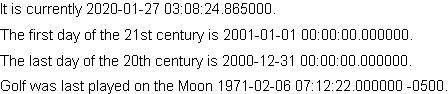 |
It is currently {DateTime}.

The first day of the 21st century is
{DateTime "01/01/2001"}.

The last day of the 20th century is
{DateTime year=2000, month=12, day=31}.

Golf was last played on the Moon
{DateTime "2/6/71 7:12:22 -0500"}.
| |
DateTimes can be converted to several different string
formats. The DateTime class has an object-describe method which returns the date and time in
a human-readable format. In addition, you can use methods and accessors of the
DateTimeInfo class through the DateTime.info accessor to
format the date and time in different ways. For example:- DateTime.info.locale-full is the date and time in the
preferred convention for the current Locale
- DateTime.info.locale-date is just the date in the
preferred convention for the current Locale
- DateTime.info.locale-time is just the time in the
preferred convention for the current Locale
- DateTime.info.iso-full is the date in ISO-8601 format,
including the UTC offset.
See DateTimeInfo for a full listing of the available string formats.Here are some examples:
| Example:
Converting DateTime to Strings |
 |
{let moon-golf:DateTime =
    {DateTime "2/6/71 7:12:22 -0500"}
}
Golf was last played on the moon on {value moon-golf.info.locale-date} at
{value moon-golf.info.locale-time}.
To be specific it was {value moon-golf}.
| |
The DateTimeInfo class gives you access to various elements of
a DateTime. As with the string formats, you access the elements via
the DateTime.info accessor. For example:- DateTime.info.year is the year.
- DateTime.info.month is the month as an integer.
- DateTime.info.locale-month is the name of the month
as a string.
- DateTime.info.utc-offset-string is the local
time zone's offset from UTC as a string in
±hhmm format.
- DateTime.info.timezone-name is a string containing
the name of the time zone the DateTime is in.
See the DateTimeInfo section for more information on
the DateTimeInfo class.You can use these accessors to create your own custom formatting:
| Example:
Using Accessors to Create Custom Formatting |
 |
{let now:DateTime = {DateTime}}

Today is {value now.info.locale-full}
(that is,
 {value now.info.locale-weekday}
 the {ordinal now.info.day} day
 of the {ordinal now.info.month} month
 ({value now.info.locale-month})
 of the year {value now.info.year}
 at {value now.info.locale-time} {value now.info.timezone-name}).

It is the {ordinal now.info.day-of-year} day of the year, which
is the {ordinal now.info.day-of-week} day of the week, called
{value now.info.locale-weekday}.
| |
The DateTime class allows current times to be initialized
from String instances. The parsing code in Curl accepts
certain non-ambiguous extended forms of ISO 8601 as well as some
additional forms intended for ease of use. Note: Entered dates must be real dates. For example referencing
Feb 29 is an error unless the year is a leap year.
In general a date is in the form:
[date] [time] [utc-offset]If date and time are both omitted then the current
date and time are assumed. If date is omitted and time
is present then the current date is assumed. If date is
present and time is omitted then midnight is assumed.
If utc-offset is omitted then the local timezone is assumed.The empty string means the current date and time in the local timezone.The supported ways to specify a date are:
yyyy-mm-dd
mm/dd/yyyy
mm/dd/yy
mm-dd
mm/ddTwo digit years are only allowed when entering American dates and
are treated as years in the twenty-first century when the year is
less than 50, otherwise they are treated as years in the twentieth
century.Leading zeros on years may not be omitted. Leading zeros for the
month and day are optional.The supported ways to specify a time are:
hh:mm
hh:mm[am\|pm]
hh:mm:ss
hh:mm:ss.sssssss
hh:mm:ss,sssssssUnless the American am/pm notation is used times are assumed to be in
24-hour format. If no seconds are specified then zero is assumed. If
no decimal fraction is specified then zero is assumed.For 24-hour times the hour 24 is allowed if all remaining
elements of the time are zero, in which case it is a synonym for
midnight of the following day.For 12-hour times the hour must range between 1 and 12. The 12-hour
notation is not valid if a date has been specified using ISO notation,
if the ISO delimiter "T" preceded the time, if an explicit seconds field
was present in the time or if an explicit timezone follows the time.The supported ways to specify a UTC offset are:
Z
+hh
-hh
+hhmm
-hhmm
+hh:mm
-hh:mmThe sign is mandatory to disambiguate from the time field. When
the UTC offset is omitted the local timezone is used. The value
Z is a synonym for +00. Leading white space before
the UTC offset is optional. Leading zeros are mandatory. The
offset may not exceed 18 hours.Note that the local timezone may include daylight savings time (DST)
but a UTC offset time never will. When entering a time which is
repeated due to DST it is not possible to specify which of the two
instances is desired and the result may vary from attempt to attempt,
even on a single platform. When entering a time that was skipped due
to DST the time will be moved forward or backwards by the DST adjustment
and the direction may vary from attempt to attempt, even on a single
platform.When a time is specified it may be preceded by the literal T as
specified by ISO 8601. When this is done there must not be any white
space between the T and the time. If a date is also specified
there must not be any whitespace between the T and the date.When directly creating DateTime and DateTimeInfo
objects, you may specify calendar representations that do not
correspond to real dates or times.When such representations are passed to DateTime they are
adjusted according to the arithmetic principles of the calendar until
all values are within their defined ranges. This process is called
normalization and makes it easy to carry out many common
calendar operations in a straight-forward manner.Some examples of large day counts follow:
1999-01-32 becomes 1999-02-01
1999-02-30 becomes 1999-03-02
2000-02-30 becomes 1999-03-01
2000-01-2374 becomes 2006-07-01In each of these cases the large day value is adjusted by removing days
a month at a time and incrementing the current month (and even year)
until all values are in range. This may also be viewed as finding the
day which is the specified number of days into the month.Similar rules are used when months, hours, minutes or seconds exceed their
normal values:
1999-13-12 becomes 2000-01-12
1999-200-3 becomes 2015-08-03
04:06:100 becomes 04:07:40
1999-01-01 23:00:99999999 becomes
2002-03-04 08:46:39It is also possible to use numbers below the normal range to go
backwards:
1999-03-00 becomes 1999-02-28
2000-03-00 becomes 2000-02-29
2000-03-(-02) becomes 2000-02-27
1999-(-10)-(-5) becomes 1998-01-26
2000-01-01 00:00:-01 becomes
1999-12-31 23:59:59When you are creating a new DateTime you can specify keyword
arguments to modify calendar time using out of range values. This is
mostly intended to make it easy to create times that have been rounded
down, but there are a few clever ways to use out of range values:
{DateTime day=0}Produces the last day of the previous calendar month at midnight.
{DateTime hour=24}Produces midnight of the next calendar day.It can also be useful to use out of range values when calculating
dates relative to other dates you already know:
let now:DateTime = {DateTime}
set now.info = {now.info.modify-clone new-day=(now.info.day+7)}Returns exactly the same time seven days from now. To get midnight
seven days from now you can use a similar technique, but taking
advantage of the rounding down behavior of DateTime.default:
let now:DateTime = {DateTime}
let future:DateTime = {DateTime now, day=(now.info.day+7)}
A length of time in the Curl language is represented by Time, which
is simply a quantity of time, such as
15seconds or 13.32days. As with other quantities, you
can add different units of Time together, and have conversions
handled automatically.
| Example:
Using the Time Class |
 |
{let some-seconds:Time = 23479233seconds}
{let some-minutes:Time = 232643minutes}
{let some-hours:Time = 83.343hours}
{let total-time:Time = some-seconds + some-minutes + some-hours}
The total time is {value total-time / 1day} days.
| |
Time can be used in conjunction with several DateTime
methods to result in a modified DateTime, as explained below.
You can add Times to and subtract them from DateTimes
using standard addition and subtraction.
| Example:
Performing Addition on a DateTime Object |
 |
{let now:DateTime = {DateTime}}
{let leave-in:Time = .5hour}

If you want to leave in {value leave-in / 1s}
seconds, set your alarm for
{value (now + leave-in).info.locale-time}.
| |
You can also add and subtract portions of a DateTime to get a
new DateTime. When you do this, the DateTime class
silently fixes resulting dates and times that do not correspond to actual
calendar dates.
| Example:
Adding and Subtracting portions of a
DateTime Class |
 |
{let now:DateTime = {DateTime}}

|| Add 80 to day parameter in order to get a new date.
{let returnday:DateTime = {DateTime now, day={value now.info.day + 80}}}

If you left on an eighty-day around the world trip today,
you'd get back on {value returnday.info.locale-date}

|| Since day=1 is the first of the month, day=0 must be the
|| previous day, that is, the last day of the previous month.
Midnight of the last day of the previous month was
{value {DateTime day=0}.info.locale-full}
| |
The DateTime class provides the method DateTime.elapsed for determining the amount of time which has elapsed
since a given DateTime. DateTime.elapsed is a
shorthand for calling DateTimeData.elapsed on the underlying
DateTimeData.
| Example:
Displaying Elapsed Time Using the DateTime Class |
 |
|| Use the "date normalization" feature of the DateTime class
|| to get midnight of the next day.
{let midnight:DateTime = {DateTime hour=24}}

It will be tomorrow in
{value -{midnight.elapsed} / 1hour} hours.
| |
You can use the method DateTime.compare to compare one
DateTime with another. DateTime.compare uses DateTimeData.compare to compare the underlying data.
| Example:
Comparing Date and Time |
 |
|| Acquire "now" once, for efficiency
{let now:DateTime = {DateTime}}

|| Use optional parameters to set the time of meals.
{let breakfast:DateTime = {DateTime now, hour=7}}
{let lunch:DateTime = {DateTime now, hour=12}}
{let dinner:DateTime = {DateTime now, hour=20}}

{if {breakfast.compare now} < 0 then
    {text You missed breakfast.}
 else
    {text
        Breakfast is in
        {value -{breakfast.elapsed ending=now} / 1hour} hours.}
}
{if {lunch.compare now} < 0 then
    {text You missed lunch.}
 else
    {text
        Lunch is in
        {value -{lunch.elapsed ending=now} / 1hour} hours.}
}
{if {dinner.compare now} < 0 then
    {text You missed dinner.}
 else
    {text
        Dinner is in
        {value -{dinner.elapsed ending=now} / 1hour} hours.}
}
| |
Copyright © 1998-2019 SCSK Corporation.
All rights reserved.
Curl, the Curl logo, Surge, and the Surge logo are trademarks of SCSK Corporation.
that are registered in the United States. Surge
Lab, the Surge Lab logo, and the Surge Lab Visual Layout Editor (VLE)
logo are trademarks of SCSK Corporation.