| 要約: |
|
| 例: "単純なドラッグ アンド ドロップ関係の作成" | |
![]() | |
{HBox spacing = 5cm, valign = "center",
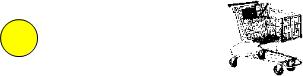
|| Step 1: this circle is the 'dragee' It can be dragged
|| because the dragee option is set. NOTE: It must be set to
|| ImageDragee.
{EllipseGraphic width = 1cm, height = 1cm, dragee = {ImageDragee}},
{Frame || Step Two: this image is the 'drop target'.
width = 2cm, height = 2cm,
background = {Background {url "../../default/images/shopping-cart.gif"}},
|| The following line handles the DragOver event. You
|| must assign the event to a variable (in this case 'e')
|| so that you can call its will-accept-drop? method.
{on e:DragOver do
{e.will-accept-drop?
|| Returns one of the four DragEffect constants.
|| You must include four positional arguments of
|| the same data types, as shown below.
{proc {type:Type, x:Distance, y:Distance,
effect:#DragEffect}:DragEffect
{return drag-effect-copy}
} } }, || stacked for compactness
|| Step Three: The following line handles the Drop event.
|| You must assign the event to a variable (in this case
|| 'e') so that you can call its accept-drop method.
{on e:Drop do
{e.accept-drop
|| Return one of the four DropResult objects. You
|| must include four positional arguments of the
|| same data types, as shown below.
{proc {a:any, x:Distance, y:Distance,
effect:#DragEffect}:DropResult
{return {DropResultCopy
|| The 'action' argument to a
|| DropResult object specifies what
|| action occurs when the dragee is
|| dropped. Supply a procedure to the
|| 'action' argument.
action = {proc {}:void
{popup-message
"You dropped the ball!",
modal? = true}
} } } } } } } } |
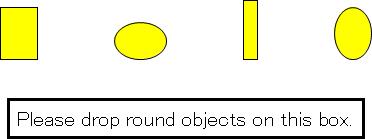
| 例: 目標にドロップできるドラッグ対象の指定 | |
![]() | |
{VBox halign = "center", spacing = 1cm,
|| The four objects in this HBox are dragees. Note that they
|| are of two types, EllipseGraphic and RectangleGraphic.
{HBox spacing = 2cm,
{RectangleGraphic
width = 10mm, height = 14mm, dragee = {ImageDragee}},
{EllipseGraphic
width = 14mm, height = 10mm, dragee = {ImageDragee}},
{RectangleGraphic
width = 4mm, height = 16mm, dragee = {ImageDragee}},
{EllipseGraphic
width = 10mm, height = 14mm, dragee = {ImageDragee}}
},
{TextFlowBox || This TextFlowBox is the drop target.
border-width = 2pt, border-color = "black", margin = 5pt,
{text font-size = 16pt, Please drop round objects on this box.},
{on e:DragOver do
{e.will-accept-drop?
{proc
{type:Type, x:Distance, y:Distance,
effect:#DragEffect}:DragEffect
|| The following code specifies that
|| EllipseGraphics can be dropped on the drop
|| target and other objects cannot.
|| Note that the name of the first argument in
|| the procedure (type) is used to call
|| methods of the dragee.
{if {type.subtype-of? EllipseGraphic} then
{return drag-effect-copy}
else
{return drag-effect-none}
}
}
}
},
|| The rest of code handles the Drop event. Note that
|| only one DropResult is specified. It is the DragEffect
|| that must distinguish between different dragees.
{on e:Drop do
{e.accept-drop
{proc
{a:any,
x:Distance,
y:Distance,
effect:#DragEffect
}:DropResult
{return
{DropResultCopy
action =
{proc {}:void
{popup-message
modal? = true,
"Success!"
} } } } } } } } } |
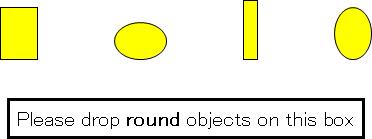
| 例: の条件に基づいて DropDropResult を指定 | |
![]() | |
{VBox halign = "center", spacing = 1cm,
{HBox spacing = 2cm,
|| The following four objects are dragees, of two
|| different types (EllipseGraphic and RectangleGraphic).
{RectangleGraphic
width = 10mm, height = 14mm, dragee = {ImageDragee}},
{EllipseGraphic
width = 14mm, height = 10mm, dragee = {ImageDragee}},
{RectangleGraphic
width = 4mm, height = 16mm, dragee = {ImageDragee}},
{EllipseGraphic
width = 10mm, height = 14mm, dragee = {ImageDragee}
}
},
{TextFlowBox || The drop target.
border-width = 2pt, border-color = "black", margin = 5pt,
{text font-size = 16pt,
Please drop {bold round} objects on this box},
|| The following code handles the DragOver event.
|| Any dragee can be dropped on this drop target.
{on e:DragOver do
{e.will-accept-drop?
{proc
{type:Type,
x:Distance,
y:Distance,
effect:#DragEffect
}:DragEffect
{return drag-effect-copy}
}
}
},
|| The following code handles the Drop event. The
|| 'action' taken depends on the criteria in this 'if'
|| expression. Note that the name of the first argument
|| in the procedure that returns the DropResult (a) refers
|| to the dragee.
{on e:Drop do
{e.accept-drop
{proc
{a:any,
x:Distance,
y:Distance,
effect:#DragEffect}:DropResult
{return
{DropResultCopy
action =
{proc {}:void
{if a isa EllipseGraphic then
{popup-message
modal? = true,
"Correct. The object is round."}
else
{popup-message
modal? = true,
"Wrong! The object is not round."}
}
}
}
}
}
}
}
}
}
|

| 例: ドラッグ アンド ドロップ操作をコントロールするための CTRL キーの使用 | |
![]() | |
{text Drop the circle on the box while holding down the {bold CTRL}
key. Then drop the circle on the box without holding it down.}
{HBox
valign = "center", width = 9cm,
{EllipseGraphic || the dragee
width = 1cm, height = 1cm, dragee = {ImageDragee}},
{Fill width = {make-elastic preferred-size = 10cm}},
{VBox || the drop target
width = 1.5cm, height = 1.5cm, border-width = 1pt,
border-color = {FillPattern.get-black},
opaque-to-events? = true,
{on e:DragOver do
{e.will-accept-drop?
{proc
{a:Type,
b:Distance,
c:Distance,
d:#DragEffect
}:DragEffect
|| This drop target returns one of two drag
|| effects based on the state of the
|| DropSource. The call to
|| DragEffect.has-effect? reveals this state.
|| The DragEffect object is named "d" in the
|| arguments to this procedure. If the user
|| has pressed CTRL, the state of the
|| DropSource is "copy".
{if {d.has-effect? "copy"} then
{return drag-effect-copy}
else
{return drag-effect-move}
}
}
}
},
{on e:Drop at vb:VBox do
{e.accept-drop
{proc
{w:any,
x:Distance,
y:Distance,
z:#DragEffect
}:DropResult
|| This drop target returns one of two drop
|| results based on the Dragsource's state, as
|| revealed by the call to
|| DragEffect.has-effect? The DragEffect is
|| named "z" in the arguments to this
|| procedure. If the user has pressed CTRL,
|| the state of the DropSource is "copy".
{if {z.has-effect? "copy"} then
{return
{DropResultCopy
action =
{proc {}:void
|| In this case a copy of the
|| dragee (w) is added.
{vb.add {w.clone-appearance}}
}
}
}
else
{return
{DropResultMove
action =
{proc {}:void
|| In this case the dragee (w)
|| itself is added.
{vb.add w}
}
} } } } } } } } |
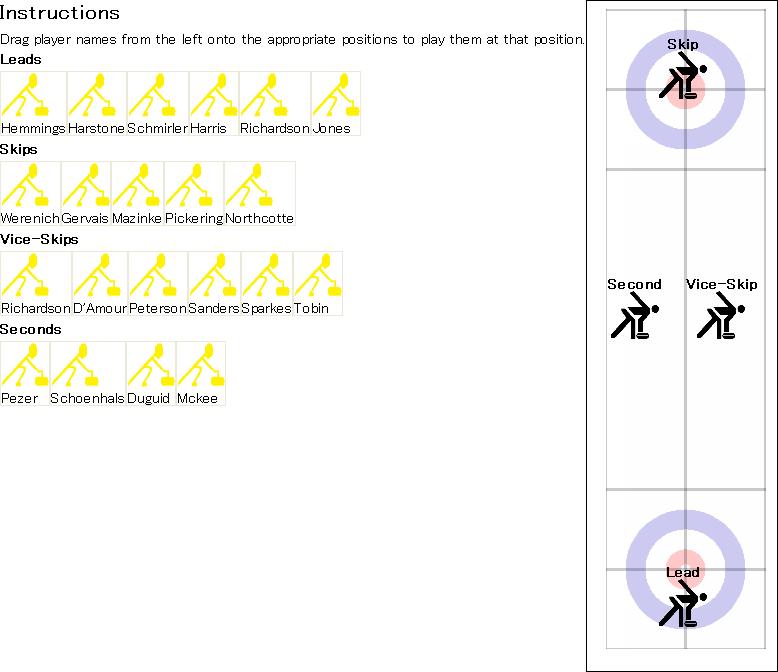
| 例: DragEnter および DragLeave の使用 | |
![]() | |
|| curler-position-target creates a drop target for dropping a
|| CurlPlayer of a particular type. It takes a position string,
|| which it displays, and a position-type, which is compared
|| against the type being dropped.
{define-class CurlerPositionTarget {inherits VBox}
field position:String
field position-type:Type
|| display holder for adding the name of the player.
field name-holder:TextFlowBox
{constructor {default
position:String,
position-type:Type
}
set self.position = position
set self.position-type = position-type
set self.name-holder = {TextFlowBox}
|| construct a VBox, which is the drop target. Its contents
|| are the position name, a picture, and then the name-holder,
|| which will be modified when the drop occurs.
{construct-super
halign = "center",
{bold {value position}},
{image
source = {url "../../default/images/curler3-transparent.gif"},
width = 0.5in, height = 0.5in, blocking? = true
},
self.name-holder}}
|| DragOver handler compares the type being dragged
|| to the type that we accept.
{method public {on-drag-over e:DragOver}:void
{e.will-accept-drop?
{proc {t:Type, x:Distance,
y:Distance, effect:#DragEffect}:DragEffect
{if {self.right-player-type? t} then
{return drag-effect-copy}
else
{return drag-effect-none}}
{e.consume}
}}}
|| Drop handler makes sure that the right type is dropped. If
|| so, it adds the name in dragee to the display by changing the
|| contents of the name-holder.
{method public {on-drop e:Drop}:void
|| Make sure to remove any background added by
|| the DragEnter handler
{unset self.background}
{e.accept-drop
{proc {a:any, x:Distance,
y:Distance, effect:#DragEffect}:DropResult
{if {self.right-player-type? {type-of a}} then
{return
{DropResultCopy
action = {proc {}:void
let name-holder:TextFlowBox = self.name-holder
{name-holder.clear}
{name-holder.add a.player-name}
{e.consume}
}}}
else
{return {DropResultNone}}}
}
}
}
|| DragEnter handler sets the background if we are over the
|| right type of object
{method public {on-drag-enter e:DragEnter}:void
let right-type?:bool = true
{e.dss.for-each
{proc {ds:DataTransferSource}:void
{unless {self.right-player-type? {ds.get-data-type}}
do set right-type? = false}}}
{if right-type? then
set self.background = "yellow"}
{e.consume}
{super.on-drag-enter e} || Call the superclass implementation
}
{method public {on-drag-leave e:DragLeave}:void
{unset self.background}
{e.consume}
{super.on-drag-leave e} || Call the superclass implementation
}
{method private {right-player-type? t:Type}:bool
{return (self.position-type == t)}
}
}
|| CurlPlayer is an abstract class whose subclass can
|| be dropped on a curler-position-target.
{define-class abstract CurlPlayer {inherits VBox}
|| player name
field player-name:String
{constructor {default player-name:String}
set self.player-name = player-name
{construct-super
{Frame
{image
source = {url "../../default/images/curler4-transparent.gif"},
blocking? = true},
width = 0.5in,
height = 0.5in
},
player-name,
border-width = 1pt,
text-selectable? = false,
|| All you have to do to make it draggable
dragee = {ImageDragee}
}
}
}
|| Derivations for skip, vice-skip, second, and lead.
{define-class CurlSkip {inherits CurlPlayer}
{constructor {default player-name:String}
{construct-super player-name}}}
{define-class CurlViceSkip {inherits CurlPlayer}
{constructor {default player-name:String}
{construct-super player-name}}}
{define-class CurlSecond {inherits CurlPlayer}
{constructor {default player-name:String}
{construct-super player-name}}}
{define-class CurlLead {inherits CurlPlayer}
{constructor {default player-name:String}
{construct-super player-name}}}
|| Main display code
{value
|| create a canvas on which to put the curler-position-target
|| objects.
let c:Canvas = {Canvas
width = 2in,
height = 7in,
border-color = "black",
border-width = 1pt
}
|| background image is the curl playing surface.
{c.add {image
source = {url "../../default/images/sheetofice2.gif"},
blocking? = true},
x = .2in, y = 6.75in}
|| add the curler-position-targets for the positions.
{c.add {CurlerPositionTarget "Skip", CurlSkip},
x = 1in, y = 0.5in}
{c.add {CurlerPositionTarget "Second", CurlSecond},
x = 0.5in, y = 3in}
{c.add {CurlerPositionTarget "Vice-Skip", CurlViceSkip},
x = 1.4in, y = 3in}
{c.add {CurlerPositionTarget "Lead", CurlLead},
x = 1in, y = 6in}
|| Here's what gets displayed:
{HBox
valign = "top",
|| VBox contains instructions and players.
{VBox
spacing = 4pt,
{TextFlowBox
{bold { big Instructions}},
{paragraph Drag player names from the left onto the appropriate
positions to play them at that position. }
},
{bold Leads},
{RasterBox
{CurlLead "Hemmings"},
{CurlLead "Harstone"},
{CurlLead "Schmirler"},
{CurlLead "Harris"},
{CurlLead "Richardson "},
{CurlLead "Jones "}},
{bold Skips},
{RasterBox
{CurlSkip "Werenich"},
{CurlSkip "Gervais"},
{CurlSkip "Mazinke"},
{CurlSkip "Pickering "},
{CurlSkip "Northcotte"}},
{bold Vice-Skips},
{RasterBox
{CurlViceSkip "Richardson"},
{CurlViceSkip "D'Amour"},
{CurlViceSkip "Peterson"},
{CurlViceSkip "Sanders"},
{CurlViceSkip "Sparkes"},
{CurlViceSkip "Tobin"}},
{bold Seconds},
{RasterBox
{CurlSecond "Pezer"},
{CurlSecond "Schoenhals"},
{CurlSecond "Duguid"},
{CurlSecond "Mckee"}
}
}, || VBox
c || instantiate the Canvas object
} || HBox
} || main display code
|
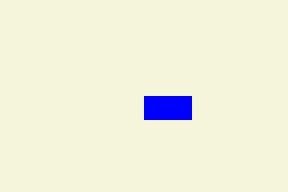
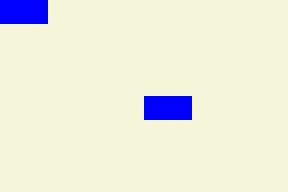
| 例:
ドラッグ対象の | |
![]() | |
|| SimpleEditableCanvas is a drop target
{define-class public SimpleEditableCanvas {inherits Canvas}
{constructor {default ...}
{construct-super ...}
}
{method public {on-drop e:Drop}:void
{e.accept-drop
{proc {a:any,
x:Distance,
y:Distance,
effect:#DragEffect}:DropResult
|| Only support move
{if {effect.has-effect? "move"} then
{return {DropResultMove action =
{proc {}:void
|| get the dragee option from
|| the object being dropped
let dragee:Dragee = a.dragee
|| compute the new position in the drop
|| container
let (real-x:Distance, real-y:Distance) =
{dragee.get-drop-position x, y, self}
{self.add a, x = real-x, y = real-y}
}}}
else
{return {DropResultNone}}
}
}}
{e.consume}
{super.on-drop e}
}
{method public {on-drag-over e:DragOver}:void
{e.will-accept-drop?
{proc {t:Type,
x:Distance,
y:Distance,
effect:#DragEffect}:DragEffect
|| only supports move
{if {effect.has-effect? "move"} then
{return drag-effect-move}
else
{return drag-effect-none}
}
}}
{e.consume}
{super.on-drag-over e}
}
}
{value let simple-canvas =
{SimpleEditableCanvas
width = 3in,
height = 2in,
background = "beige"}
let simple-canvas-obj =
{Frame
width = 0.5in,
height = 0.25in,
background = "blue",
dragee = {ImageDragee}
}
{simple-canvas.add simple-canvas-obj, x = 1.5in, y = 1in}
{value simple-canvas}
}
|
| 例: 複数のオブジェクトのドラッグ | |
![]() | |
|| A frame that is both draggable and selectable
{define-class SimpleDraggableFrame {inherits Frame}
{constructor {default ...}
{construct-super.Frame
dragee = {ImageDragee},
background = "blue",
graphic-selectable = {GraphicSelectable},
...
}
}
}
{define-class SimpleEditableCanvas {inherits Canvas}
{constructor {default ...}
{construct-super ...}
}
{method public {on-drop e:Drop}:void
{e.accept-drop
{proc {a:any,
x:Distance,
y:Distance,
effect:#DragEffect}:DropResult
|| Only support move
{if {effect.has-effect? "move"} then
{return {DropResultMove action =
{proc {}:void
|| get the dragee option from
|| the object being dropped
let dragee:Dragee = a.dragee
|| compute the new position in the drop
|| container
let (real-x:Distance, real-y:Distance) =
{dragee.get-drop-position x, y, self}
{self.add a, x = real-x, y = real-y}
}}
}
else
{return {DropResultNone}}
}
}}
{e.consume}
{super.on-drop e}
}
{method public {on-drag-over e:DragOver}:void
{e.will-accept-drop?
{proc {t:Type,
x:Distance,
y:Distance,
effect:#DragEffect}:DragEffect
|| only supports move
{if {effect.has-effect? "move"} then
{return drag-effect-move}
else
{return drag-effect-none}
}
}}
{e.consume}
{super.on-drag-over e}
}
}
{value
let simple-canvas:SimpleEditableCanvas =
{SimpleEditableCanvas
width = 3in,
height = 2in,
background = "beige"
}
{simple-canvas.add
{SimpleDraggableFrame
width = 0.5in,
height = 0.25in},
x = 1.5in,
y = 1in
}
{simple-canvas.add
{SimpleDraggableFrame
width = 0.5in,
height = 0.25in},
x = 0in,
y = 0in
}
{DiscreteGraphicSelectionFrame
simple-canvas
}
}
|
| 例: ファイルのドラッグ アンド ドロップ | |
![]() | |
{define-proc {process-urls urls:{Array-of Url}}:void
{vb.clear}
{for url in urls do
{vb.add url.filename}
}
}
{let vb:VBox =
{VBox
background = "silver",
{Frame width = 2cm, height = 2cm}, ||give box initial size
{on e:DragOver do
{e.will-accept-drop?
{proc {type:Type, x:Distance, y:Distance,
effect:#DragEffect}:DragEffect
{return
{if type == {Array-of Url} then
drag-effect-copy
else
drag-effect-none
}
}
}
}
},
{on e:Drop do
{e.accept-drop
{proc {a:any, x:Distance, y:Distance,
effect:#DragEffect}:DropResult
{return
{DropResultCopy
action = {proc {}:void
{type-switch a
case urls:{Array-of Url} do
{process-urls urls}
}
}
}
}
}
}
}
}
}
{value vb}
|